Skip to content
OnMSFT.com
  • Home
  • About
  • Contact
  • News
  • How-to
  • Feature stories
  • Deals
  • Microsoft / office 365
  • Reviews
Menu
  • Home
  • About
  • Contact
  • News
  • How-to
  • Feature stories
  • Deals
  • Microsoft / office 365
  • Reviews
  1. Home
  2. News
  3. AI-based noise suppression, polls in Teams meetings, and more. Here’s what’s new in Teams for November 2020

AI-based noise suppression, polls in Teams meetings, and more. Here’s what’s new in Teams for November 2020

Rabia Noureen Rabia Noureen
December 2, 2020
2 min read

Microsoft has just published a monthly recap of tons of new features announced for Microsoft Teams in the month of November. From the AI-based noise suppression capability, polls in Teams meetings, and more, here’s what you need to know.

Meetings features

We are starting first with the chat and meetings features. Last month, Microsoft added some new Together mode scenes, so that users can change their view to a conference room, auditorium, or a coffee shop-like environment in their meetings.

Another feature added for calling is the ability to enable a new presentation mode on iOS devices. Thanks to this feature, users can now see more meeting participants on their screens. In addition, there’s the ability to see shared content and a spotlighted participant simultaneously. Some of the other features added to Teams in November can be seen below:

  • The real-time noise suppression capability is rolling out for all users, and it helps to reduce distraction during meetings.
  • Meeting organizers can create Polls in Microsoft Teams meetings.
  • The full-screen support is available in new meetings experience.
  • The new Meet now feature now lets users start an instant meeting from their mobile devices.

Chat & Collaboration features
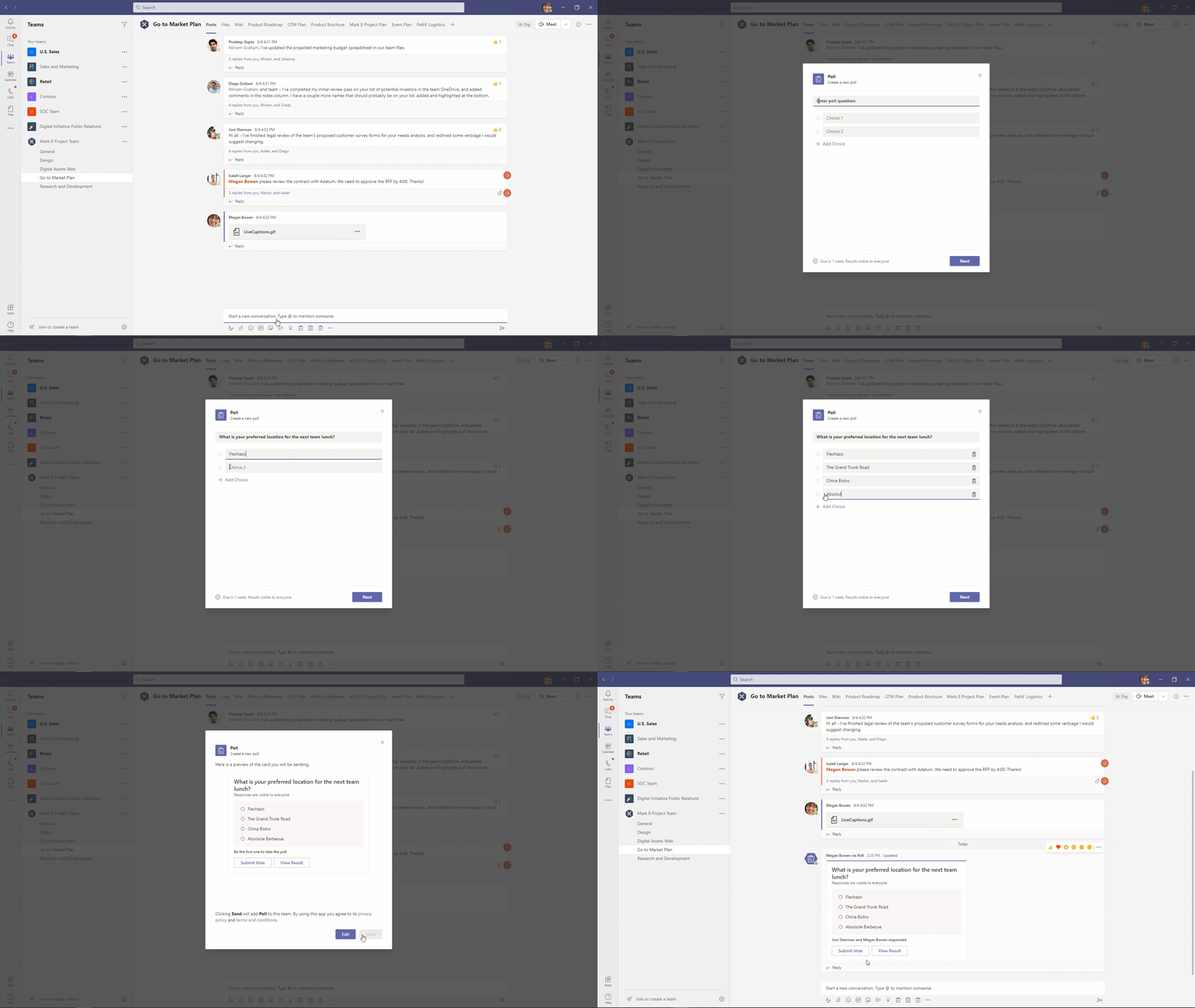
Next up are the Chat & Collaboration features. It’s been a busy month for chat news, as Microsoft Teams picked up four new features. First of all, Microsoft has introduced additional options to gather feedback in Teams. The new Power Automate integration allows users to create new templates for creating polls, surveys, and checklists in Teams without using 3rd party apps. There were also some important features, added too, which you can see below:

  • Users now have an option to pin posts in Teams channels.
  • Microsoft Teams picked up the ability to set presence status duration.
  • The Inline message translation capability allows users to translate posts in channels and chat.

Calling features

Yealink.png

Next up are the Calling features. The biggest one here is Call Merge, which allows users to merge their Teams VoIP and PSTN active 1-1 calls into another 1-1 call or another group call. Also, with the new Survivable Branch Appliance (SBA) support, Microsoft Teams users can now place and receive PSTN calls even in case of a WAN outage.

Moving on to features aimed at developers, Microsoft has announced the new Power Platform and custom development capabilities in Teams. Lastly, some new Teams devices, including Microsoft Teams displays, Yealink A20, and more, were announced this month. We invite you to check out Microsoft’s blog post for more details.


Share This Post:

Tags: Microsoft | Microsoft 365 | Microsoft Teams | Office 365
Share this article:
Tags:
Microsoft Microsoft 365 Microsoft Teams Office 365
Previous Article IPhone 12 Max Vs Surface Duo Review: A Close Call, But I’m Sticking With The IPhone – onmsft.com Next Article Microsoft investing in eSports with recent Smash.gg acquisition

Related Articles

Chrome tests Google Drive file uploads in the AI Mode compose box

April 14, 2026
Gemini image creation using right click desktop Chrome

Chrome lets you remake images with Gemini on desktop using just a right-click

April 13, 2026
Samsung Display crosses 5 million QD-OLED monitor shipments as demand grows fast, with new panels and strong premium market expansion worldwide.

Samsung Display Ships 5 Million QD-OLED Monitor Panels in Four Years

April 9, 2026

Leave a Comment Cancel reply

Your email address will not be published. Required fields are marked *

Recent Posts

  • Chrome tests Google Drive file uploads in the AI Mode compose box
  • Chrome lets you remake images with Gemini on desktop using just a right-click
  • Samsung Display Ships 5 Million QD-OLED Monitor Panels in Four Years
  • Intel Arc Pro B70 Teardown Reveals Blower Cooler and Early Board Design Details
  • Users Modify RTX 5090 Lightning Z Hardware to Unlock MSI’s Restricted 2500W BIOS

Recent Comments

  1. XxRIVTYxX on Intel Says It Tried to Help Before Crimson Desert Dropped Arc Support
  2. Gaurav Kumar on Chrome Prepares Nudge to ‘Move Tabs to the Side’ as Vertical Tabs Near Release
OnMSFT.com

The Tech News Site

Categories

  • Windows
  • Surface
  • Xbox
  • How-To
  • OnPodcast
  • Gaming
  • Edge
  • Teams

Recent Posts

  • Chrome tests Google Drive file uploads in the AI Mode compose box
  • Chrome lets you remake images with Gemini on desktop using just a right-click
  • Samsung Display Ships 5 Million QD-OLED Monitor Panels in Four Years
  • Intel Arc Pro B70 Teardown Reveals Blower Cooler and Early Board Design Details
  • Users Modify RTX 5090 Lightning Z Hardware to Unlock MSI’s Restricted 2500W BIOS

Quick Links

  • About OnMSFT.com
  • Contact OnMSFT
  • Join Our Team
  • Privacy Policy
© 2010–2026 OnMSFT.com LLC. All rights reserved.
About OnMSFT.comContact OnMSFTPrivacy Policy
