Skip to content
OnMSFT.com
  • Home
  • About
  • Contact
  • Windows
  • Surface
  • Xbox
  • How-To
  • OnPodcast
  • Edge
  • Teams
  • Gaming
Menu
  • Home
  • About
  • Contact
  • Windows
  • Surface
  • Xbox
  • How-To
  • OnPodcast
  • Edge
  • Teams
  • Gaming
  1. Home
  2. News
  3. Microsoft Teams adds option to create Planner and To Do tasks from chats or channel posts – onmsft.com

Microsoft Teams adds option to create Planner and To Do tasks from chats or channel posts – onmsft.com

Rabia Noureen Rabia Noureen
June 10, 2021
2 min read

Microsoft Teams has released a new update that enables users to create Tasks from Teams chats or channel posts. This feature was announced back in September 2020, and it is now generally available in the Microsoft Teams desktop app.

The new tasks management experience was spotted yesterday by Microsoft MVP Adam Deltinger in the desktop version of Teams. Prior to this update, users had to copy and paste the message manually in order to create a Microsoft To Do or Planner task. This new functionality has been designed to let users identify tasks that arise naturally in conversations and quickly them tasks directly from any chat/channel conversation in Teams.
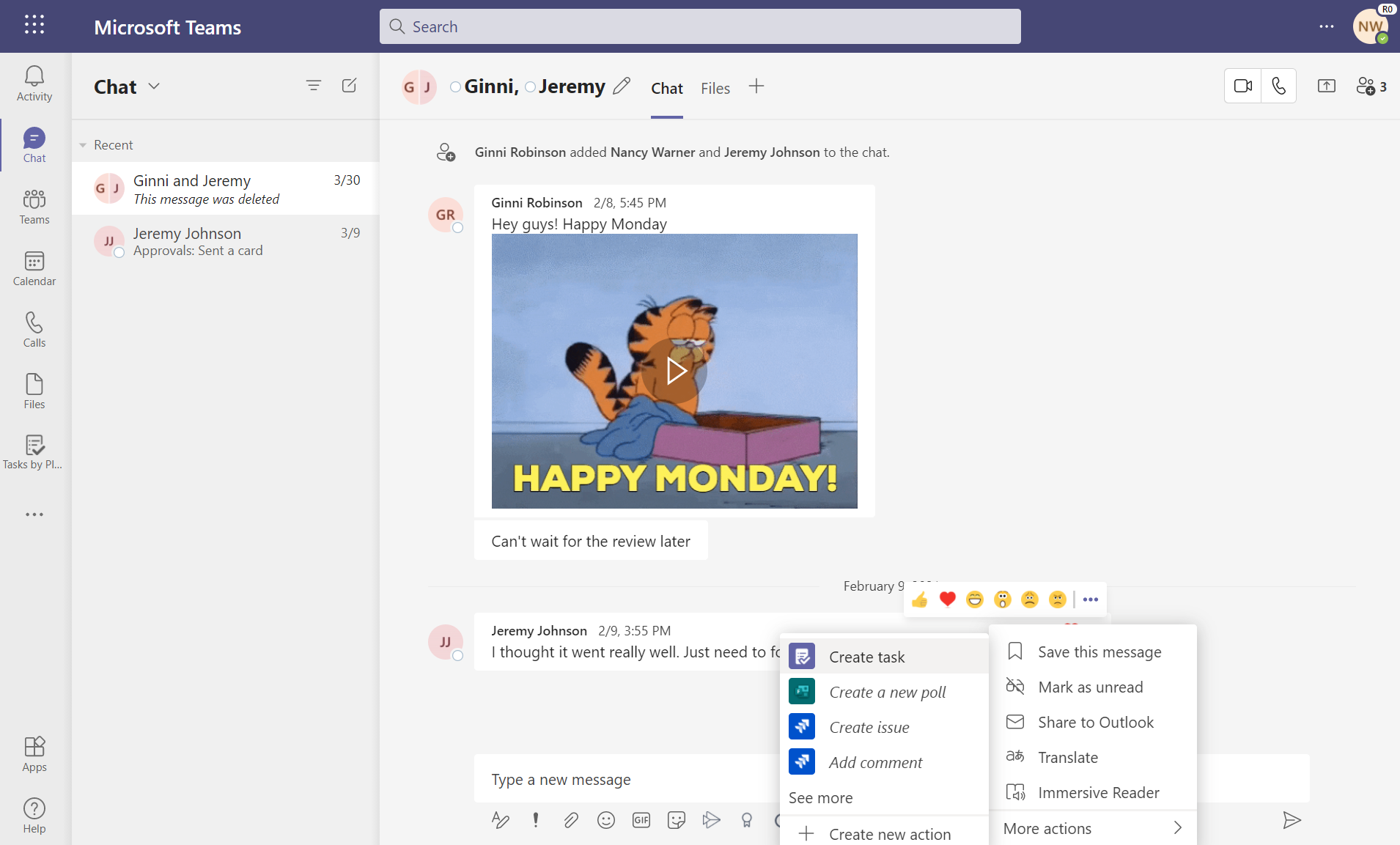
Create Task from Teams chat

To try out this feature, hover over any message in a chat and click the context menu (. . .) button. Then, select “More actions,” click the “Create task” option, and a dialogue box will appear on the screen. Finally, set a due date, priority, assignment, or add notes and click the “Add Task” button.

After completing the steps, the task will be created, and it will be available in the Tasks app in Teams and in the “Tasks” list of Microsoft To Do. It is important to note that users will be able to add their individual tasks to “My tasks” and collaborative tasks to any shared plan. Both types of tasks will include a link back to the original chat or channel message to provide context.
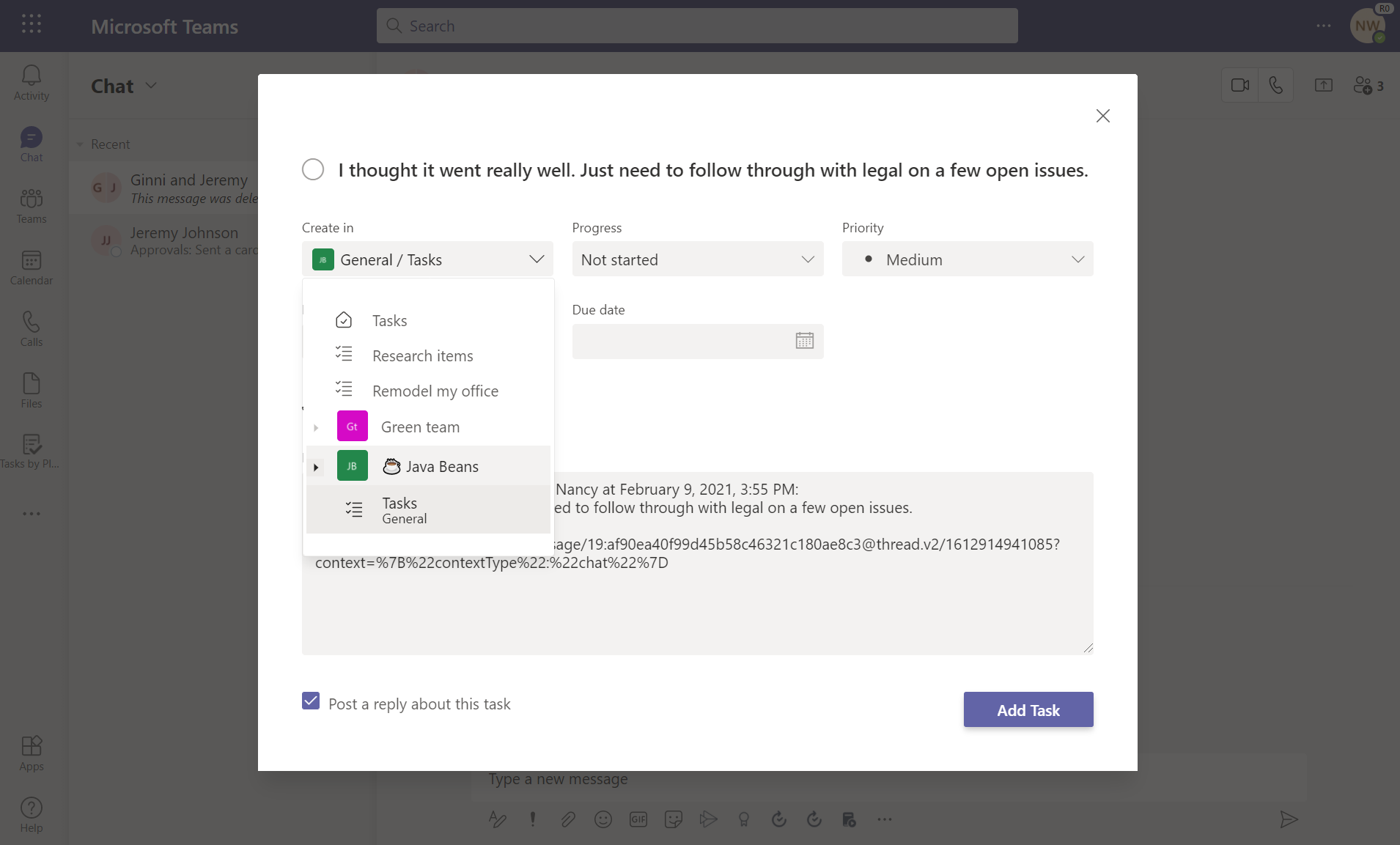
Create Task from Teams chat

Overall, the ability to create tasks right from the chat or channel posts is a welcome addition to Microsoft Teams. This capability should make it easier for employees to track important information and take action on them accordingly. The feature is turned on by default in the app, but users will need to install the Tasks app in Teams to use this feature.

Share This Post:

Share this article:
Tags:
Microsoft 365 Microsoft Teams
Previous Article Microsoft reveals big Xbox Cloud Gaming expansion with new devices, platforms, and server upgrades Next Article Microsoft to ship new first-party game on Xbox Game Pass every quarter as momentum grows

Related Articles

Microsoft Edge browser video scrubbing feature

Microsoft Edge tests video scrubbing so you don’t need to switch tabs

March 23, 2026

Buyer Pays $3,200 for RTX 5090, Gets $2 Detergent Instead, Amazon Denies Refund

March 23, 2026
Intel Core 9 273PQE benchmark shows strong performance with 12 P-cores, trailing i9-14900K while competing closely with high-end CPUs.

Intel Bartlett Lake Core 9 273PQE Scores Close to i9-14900K Despite 12 Cores

March 23, 2026

Leave a Comment Cancel reply

Your email address will not be published. Required fields are marked *

Recent Posts

  • Microsoft Edge tests video scrubbing so you don’t need to switch tabs
  • Buyer Pays $3,200 for RTX 5090, Gets $2 Detergent Instead, Amazon Denies Refund
  • Intel Bartlett Lake Core 9 273PQE Scores Close to i9-14900K Despite 12 Cores
  • Middle East Conflict May Cause Chip Shortage, Would Hurt the AI Industry
  • Supermicro Adds Intel Arc Pro B70 Support Ahead of Official Launch

Recent Comments

No comments to show.
OnMSFT.com

The Tech News Site

Categories

  • Windows
  • Surface
  • Xbox
  • How-To
  • OnPodcast
  • Gaming
  • Edge
  • Teams

Recent Posts

  • Microsoft Edge tests video scrubbing so you don’t need to switch tabs
  • Buyer Pays $3,200 for RTX 5090, Gets $2 Detergent Instead, Amazon Denies Refund
  • Intel Bartlett Lake Core 9 273PQE Scores Close to i9-14900K Despite 12 Cores
  • Middle East Conflict May Cause Chip Shortage, Would Hurt the AI Industry
  • Supermicro Adds Intel Arc Pro B70 Support Ahead of Official Launch

Quick Links

  • About OnMSFT.com
  • Contact OnMSFT
  • Join Our Team
  • Privacy Policy
© 2010–2026 OnMSFT.com LLC. All rights reserved.
About OnMSFT.comContact OnMSFTPrivacy Policy