Skip to content
OnMSFT.com
  • Home
  • About
  • Contact
  • News
  • How-to
  • Feature stories
  • Deals
  • Microsoft / office 365
  • Reviews
Menu
  • Home
  • About
  • Contact
  • News
  • How-to
  • Feature stories
  • Deals
  • Microsoft / office 365
  • Reviews
  1. Home
  2. News
  3. Everything new in Microsoft Excel in April 2023

Everything new in Microsoft Excel in April 2023

Kevin Okemwa Kevin Okemwa
April 26, 2023
2 min read

We’re almost at the end of April, and as usual Microsoft has published a new blog post highlighting all the new features as well as improvements that have shipped to Microsoft Excel across the web, Windows, and Mac. Here’s everything you need to know:

Excel for web

Microsoft has announced that the Chart Task Pane feature in Excel for web has added support for data editing. This means that users can now make edits on the chart’s data range, remove a series, and so on.

The company further indicated that users can access this feature under the new Data tab that’s alongside the Format tab. The is currently rolling out to Production.

Additionally, users now have added capability to add hyperlinks in comments to reference a source like a spreadsheet, document, or webpage in conversation with other users.

What’s more, users can now Speed up filtering when cells contain Unique or Duplicate Conditional Formatting rules. Excel leverages the comparison algorithm to achieve this.

Furthermore, it will now let you reduce unwanted fragmenting of conditional formatting rules that are identical within a contiguous range of cells and with unchanged priority ordering. This won’t apply to rules whose evaluation relies on a selection range like Above or Below average, Unique or Duplicate, Gradients, etc., and rules in PivotTables.

Excel for Windows

The latest Excel update for Windows users ships with the Quick Access Toolbar displayed by default. The toolbar features the Undo, Redo, and Save commands. AutoSave has also been moved to the title bar for easier accessibility. What’s more, users can easily customize the toolbar to meet their preferences.
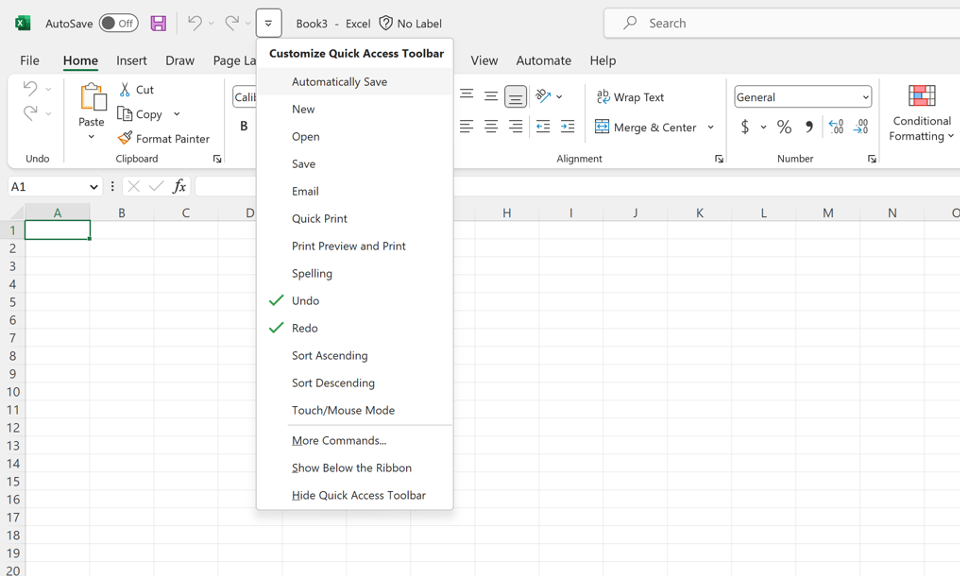
thumbnail image 1 captioned Customizable Quick Access Toolbar

It’s worth noting that the Reducing Unwanted Fragmenting of Conditional Formatting Rules feature is currently rolling out for users in the Current Channel. The feature is also shipping for Mac users.

To get information on which features are available to you or find which version of Microsoft Excel you’re on, you can visit the Excel Features Flyer site.

We’d also like invite you to check out March’s post in case you missed it. Be sure to let us know which feature you’re most anticipating in the comments.


Check out more from onmsft.com!

Share this article:
Previous Article Microsoft increases revenue and net income despite declines in software and hardware for its FY23 Q3 earnings Next Article Microsoft releases new Edge Dev update with a shortcut for the Sidebar

Related Articles

Chrome tests Google Drive file uploads in the AI Mode compose box

April 14, 2026
Gemini image creation using right click desktop Chrome

Chrome lets you remake images with Gemini on desktop using just a right-click

April 13, 2026
Samsung Display crosses 5 million QD-OLED monitor shipments as demand grows fast, with new panels and strong premium market expansion worldwide.

Samsung Display Ships 5 Million QD-OLED Monitor Panels in Four Years

April 9, 2026

Leave a Comment Cancel reply

Your email address will not be published. Required fields are marked *

Recent Posts

  • Chrome tests Google Drive file uploads in the AI Mode compose box
  • Chrome lets you remake images with Gemini on desktop using just a right-click
  • Samsung Display Ships 5 Million QD-OLED Monitor Panels in Four Years
  • Intel Arc Pro B70 Teardown Reveals Blower Cooler and Early Board Design Details
  • Users Modify RTX 5090 Lightning Z Hardware to Unlock MSI’s Restricted 2500W BIOS

Recent Comments

  1. XxRIVTYxX on Intel Says It Tried to Help Before Crimson Desert Dropped Arc Support
  2. Gaurav Kumar on Chrome Prepares Nudge to ‘Move Tabs to the Side’ as Vertical Tabs Near Release
OnMSFT.com

The Tech News Site

Categories

  • Windows
  • Surface
  • Xbox
  • How-To
  • OnPodcast
  • Gaming
  • Edge
  • Teams

Recent Posts

  • Chrome tests Google Drive file uploads in the AI Mode compose box
  • Chrome lets you remake images with Gemini on desktop using just a right-click
  • Samsung Display Ships 5 Million QD-OLED Monitor Panels in Four Years
  • Intel Arc Pro B70 Teardown Reveals Blower Cooler and Early Board Design Details
  • Users Modify RTX 5090 Lightning Z Hardware to Unlock MSI’s Restricted 2500W BIOS

Quick Links

  • About OnMSFT.com
  • Contact OnMSFT
  • Join Our Team
  • Privacy Policy
© 2010–2026 OnMSFT.com LLC. All rights reserved.
About OnMSFT.comContact OnMSFTPrivacy Policy
