Skip to content
OnMSFT.com
  • Home
  • About
  • Contact
  • News
  • How-to
  • Feature stories
  • Deals
  • Microsoft / office 365
  • Reviews
Menu
  • Home
  • About
  • Contact
  • News
  • How-to
  • Feature stories
  • Deals
  • Microsoft / office 365
  • Reviews
  1. Home
  2. News
  3. Microsoft Teams Rooms on Windows set to get updated user experience

Microsoft Teams Rooms on Windows set to get updated user experience

Kevin Okemwa Kevin Okemwa
January 31, 2023
2 min read

Microsoft has announced its plans to roll out a redesigned Microsoft Teams Rooms on Windows featuring “a vibrant new look”. These new changes will be in place to further enhance the platform’s user experience. Here’s everything you need to know:

The revamp will refreshen the calendar and make the screens more vivid on consoles. With the new changes coming to the calendar, users will be able to check their entire schedule for the day by scrolling down. What’s more, with the improved visual cues, users will now be able to better interact with the console and access a wider range of ambient screens for customization.

Once the update rolls out users will be able to establish more control over their front-of-room display while in meetings as it features a revamped UI for the view switcher menu. Essentially, users now get to choose what meeting component they want to have available on the left and right panel of their Front Row view.


thumbnail image 6 captioned Choose view on display – Front Row

The update will also include updated buttons on the console that will allow you to access all the features that you frequently make use of easily such as a meet button that allows you to quickly initiate a meeting from Teams Room and a Share button that lets you share local HDMI content. There will also be a Join via ID button which allows users to join Teams meetings directly from Teams Room using the meeting ID as well as a Call that will let you make calls to a phone number.
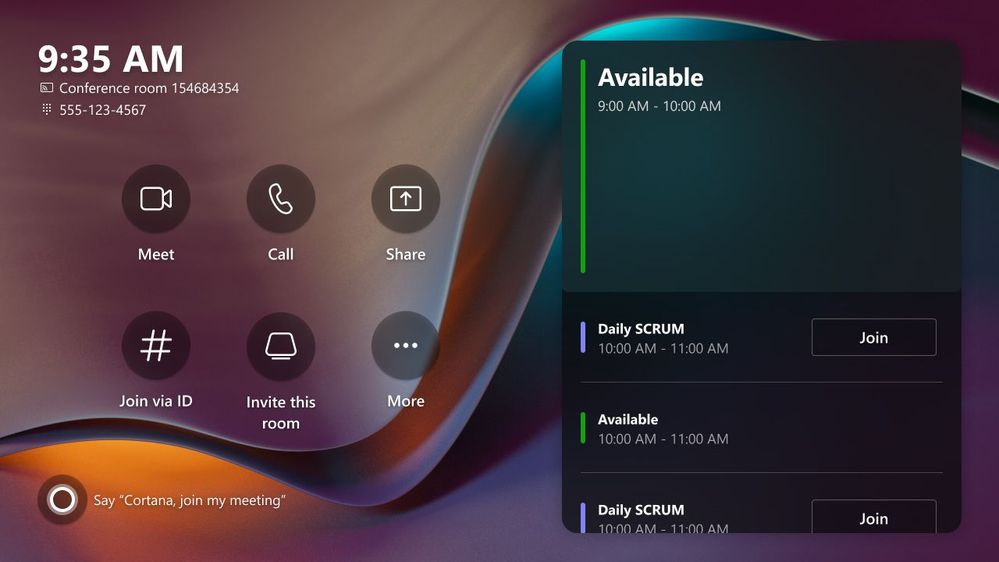
thumbnail image 2 captioned Console and calendar

Microsoft is also enhancing accessibility to Teams Room’s overflow menu by incorporating extended features into it. Here’s what will be available on the new overflow menu:

  • Invite this room: Use the Room audio and video for a Teams meeting initiated on your companion device
  • Accessibility: Enable accessibility features
  • Report a problem: Report a problem to your IT admin
  • Restart device: Restart the device functionality
  • Settings: Access settings

And finally, Microsoft will also be making it easier for users to deal with error states and associated messages as they will be simplified. These new features should be generally available by the end of this quarter to all Microsoft Teams Rooms on Windows users running the 4.16 version.

In other related news, Microsoft added new capabilities to Teams Rooms on Android designed to enhance both the meeting and collaborating experiences back in December last year. Share your thoughts on these new features in the comment section.


Share this article:
Previous Article Chromebooks make Office 365 more native with new Chrome OS update Next Article Video Filters come to Teams Meetings

Related Articles

Chrome tests Google Drive file uploads in the AI Mode compose box

April 14, 2026
Gemini image creation using right click desktop Chrome

Chrome lets you remake images with Gemini on desktop using just a right-click

April 13, 2026
Samsung Display crosses 5 million QD-OLED monitor shipments as demand grows fast, with new panels and strong premium market expansion worldwide.

Samsung Display Ships 5 Million QD-OLED Monitor Panels in Four Years

April 9, 2026

Leave a Comment Cancel reply

Your email address will not be published. Required fields are marked *

Recent Posts

  • Chrome tests Google Drive file uploads in the AI Mode compose box
  • Chrome lets you remake images with Gemini on desktop using just a right-click
  • Samsung Display Ships 5 Million QD-OLED Monitor Panels in Four Years
  • Intel Arc Pro B70 Teardown Reveals Blower Cooler and Early Board Design Details
  • Users Modify RTX 5090 Lightning Z Hardware to Unlock MSI’s Restricted 2500W BIOS

Recent Comments

  1. XxRIVTYxX on Intel Says It Tried to Help Before Crimson Desert Dropped Arc Support
  2. Gaurav Kumar on Chrome Prepares Nudge to ‘Move Tabs to the Side’ as Vertical Tabs Near Release
OnMSFT.com

The Tech News Site

Categories

  • Windows
  • Surface
  • Xbox
  • How-To
  • OnPodcast
  • Gaming
  • Edge
  • Teams

Recent Posts

  • Chrome tests Google Drive file uploads in the AI Mode compose box
  • Chrome lets you remake images with Gemini on desktop using just a right-click
  • Samsung Display Ships 5 Million QD-OLED Monitor Panels in Four Years
  • Intel Arc Pro B70 Teardown Reveals Blower Cooler and Early Board Design Details
  • Users Modify RTX 5090 Lightning Z Hardware to Unlock MSI’s Restricted 2500W BIOS

Quick Links

  • About OnMSFT.com
  • Contact OnMSFT
  • Join Our Team
  • Privacy Policy
© 2010–2026 OnMSFT.com LLC. All rights reserved.
About OnMSFT.comContact OnMSFTPrivacy Policy
