Skip to content
OnMSFT.com
  • Home
  • About
  • Contact
  • Windows
  • Surface
  • Xbox
  • How-To
  • OnPodcast
  • Edge
  • Teams
  • Gaming
Menu
  • Home
  • About
  • Contact
  • Windows
  • Surface
  • Xbox
  • How-To
  • OnPodcast
  • Edge
  • Teams
  • Gaming
  1. Home
  2. News
  3. Microsoft Teams now allows users turn off message previews in desktop notifications

Microsoft Teams now allows users turn off message previews in desktop notifications

Rabia Noureen Rabia Noureen
October 29, 2020
1 min read

Microsoft has finally released a notification option that brings the ability for Teams users to disable message previews in the toast notification. The Microsoft 365 roadmap suggests the feature is currently rolling out, so it should begin showing up for users sooner rather than later.

Back in July, we first heard that Microsoft has started working on the feature, as it was one of the key privacy requests from customers. With this release, Teams users now have an option to enable or disable message preview notifications in the toast notification. When the user disables message preview, no snippet is included in the desktop notifications.
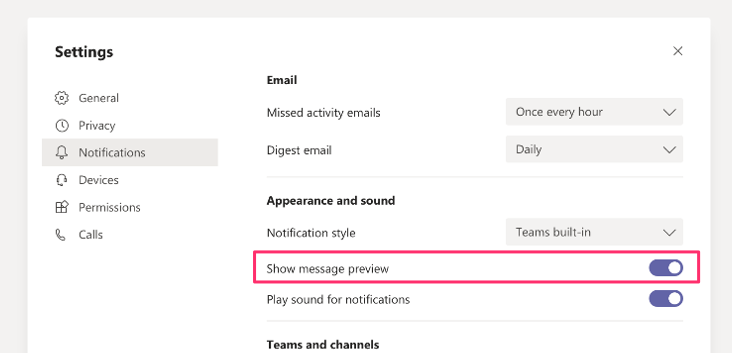
Teams notification settings

Keep in mind that the new setting is enabled by default for all users, so the app will continue to show message previews just like before. Microsoft Teams users need to disable the toggle button from the Settings manually. To do so, head to the Teams notification settings and turn off the “Show message preview” option available under the Notifications section.

If privacy is a concern for your organization, Office 365 Admins can also keep organizational data confidential on Teams iOS and Android apps lock screens by blocking data from appearing in notification previews. This feature is available on Android (v. 1.0.0.2020091301) and Teams iOS (v. 2.0.22) apps. Feel free to check out the official support article for more details.

Share This Post:

Tags: Microsoft | Microsoft 365 | Microsoft Teams | Office 365
Share this article:
Tags:
Microsoft Microsoft 365 Microsoft Teams Office 365
Previous Article Xbox One coming to China in September, China Telecom gets exclusive contract Next Article Xbox head Phil Spencer says current Xbox Game Pass pricing is “completely sustainable”

Related Articles

After Chrome, Edge tests launching the browser automatically when you sign into Windows

March 13, 2026
Latest iPhone Fold rumors reveal display crease details, hole-punch cameras, iOS multitasking layout, 12GB RAM, and storage options for Apple’s first foldable iPhone.

iPhone Fold Latest Rumors: Display, Cameras, RAM and Price Details Revealed

March 13, 2026
Samsung concerned about smartphone profits as chip prices surge

Samsung fears first mobile operating loss due to memory price surge

March 13, 2026

Leave a Comment Cancel reply

Your email address will not be published. Required fields are marked *

Recent Posts

  • After Chrome, Edge tests launching the browser automatically when you sign into Windows
  • iPhone Fold Latest Rumors: Display, Cameras, RAM and Price Details Revealed
  • Samsung fears first mobile operating loss due to memory price surge
  • Elon Musk’s X to Change Verification in Europe Following EU Fine
  • Facebook Marketplace adds Meta AI to reply to buyer messages automatically

Recent Comments

No comments to show.
OnMSFT.com

OnMSFT.com covers Microsoft news, reviews, and how-to guides. Formerly known as WinBeta, we have been your source for Microsoft news since 1998.

Categories

  • Windows
  • Surface
  • Xbox
  • How-To
  • OnPodcast
  • Gaming
  • Edge
  • Teams

Recent Posts

  • After Chrome, Edge tests launching the browser automatically when you sign into Windows
  • iPhone Fold Latest Rumors: Display, Cameras, RAM and Price Details Revealed
  • Samsung fears first mobile operating loss due to memory price surge
  • Elon Musk’s X to Change Verification in Europe Following EU Fine
  • Facebook Marketplace adds Meta AI to reply to buyer messages automatically

Quick Links

  • About OnMSFT.com
  • Contact OnMSFT
  • Join Our Team
  • Privacy Policy
© 2010–2026 OnMSFT.com LLC. All rights reserved.
About OnMSFT.comContact OnMSFTPrivacy Policy