Skip to content
OnMSFT.com
  • Home
  • About
  • Contact
  • Windows
  • Surface
  • Xbox
  • How-To
  • OnPodcast
  • Edge
  • Teams
  • Gaming
Menu
  • Home
  • About
  • Contact
  • Windows
  • Surface
  • Xbox
  • How-To
  • OnPodcast
  • Edge
  • Teams
  • Gaming
  1. Home
  2. News
  3. Microsoft now allows Teams meeting organizers to download participant reports after a meeting

Microsoft now allows Teams meeting organizers to download participant reports after a meeting

Rabia Noureen Rabia Noureen
October 9, 2020
2 min read

Microsoft Teams will now let meeting organizers download a list of participants in the app at the end of a meeting. In an update to the Microsoft 365 Admin Center message, the company noted that the feature is gradually rolling out to Windows 10, Mac, and the web clients.

As a reminder, the ability for meeting organizers to download a meeting attendance list in Microsoft Teams rolled out back in May 2020. Prior to the recent update, it was only possible to download the participant report while the meeting was in progress, and attendees were still present. However, this restriction has been removed in this release.

Notably, if the meeting participant reports are already disabled in your tenants, Office 365 admins will need to enable this feature in their organizations manually. To do this, run the following PowerShell cmdlet to turn on this feature:

Set-CsTeamsMeetingPolicy -Identity Global – AllowEngagementReport “Enabled”

Once enabled, the meeting organizer will be able to access the list of participants after the meeting within the Meeting Chat. If the meeting is recorded, the app will automatically group the recording, transcript, and participant list in the meeting chat. Otherwise, only the participant list will be available to download.
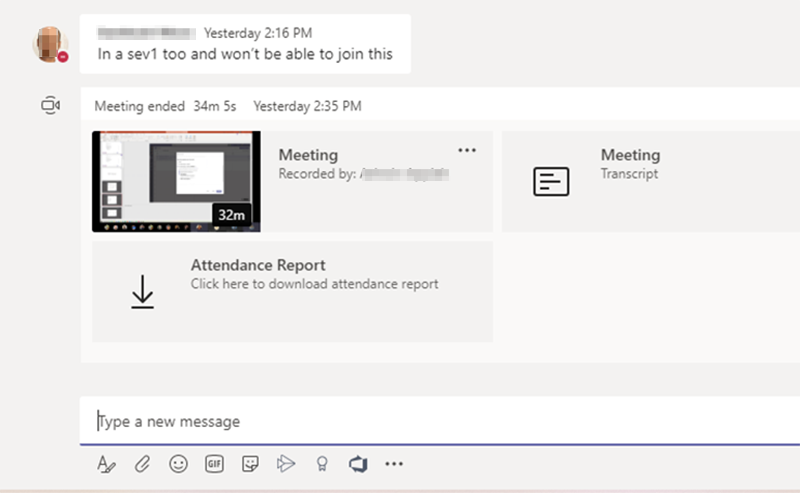
Download participant list

The improved functionality for downloading participant reports is not the only update that Microsoft has recently brought to Teams. The company has also added new data into the report to make it easier for Teams meetings organizers to manage their attendance. The participant report now provides additional information such as duration, email address, meeting start time, and meeting title.

This new experience is really helpful in education tenants where teachers need to know who had attended their meeting. While the improved functionality began rolling out last week, it will be generally available by the end of this month.


Share This Post:

Tags: Microsoft | Microsoft 365 | Microsoft Teams | Office 365
Share this article:
Tags:
Microsoft Microsoft 365 Microsoft Teams Office 365
Previous Article Microsoft reveals new Xbox Series X/S launch trailer ahead of TV debut this weekend Next Article Microsoft kicks off early holiday sale with big discounts on Surface Pro 7, Pro X, and Laptop 3

Related Articles

Chrome for Android Prepares Gemini “Let Chrome Browse for You” Setting

March 7, 2026

Microsoft, Google Say Claude Will Stay in Their Platforms Despite Pentagon Designation

March 7, 2026

Chrome’s Projects Panel Will Show Gemini and AI Mode Activity

March 7, 2026

Leave a Comment Cancel reply

Your email address will not be published. Required fields are marked *

Recent Posts

  • Chrome for Android Prepares Gemini “Let Chrome Browse for You” Setting
  • Microsoft, Google Say Claude Will Stay in Their Platforms Despite Pentagon Designation
  • Chrome’s Projects Panel Will Show Gemini and AI Mode Activity
  • Chrome’s GlowUp Design Brings Tab Strip Declutter, Tab Glow Effect, and Glass Toolbar
  • X Tests New Ad Format That Recommends Products Under Posts

Recent Comments

No comments to show.
OnMSFT.com

OnMSFT.com covers Microsoft news, reviews, and how-to guides. Formerly known as WinBeta, we have been your source for Microsoft news since 1998.

Categories

  • Windows
  • Surface
  • Xbox
  • How-To
  • OnPodcast
  • Gaming
  • Edge
  • Teams

Recent Posts

  • Chrome for Android Prepares Gemini "Let Chrome Browse for You" Setting
  • Microsoft, Google Say Claude Will Stay in Their Platforms Despite Pentagon Designation
  • Chrome's Projects Panel Will Show Gemini and AI Mode Activity
  • Chrome’s GlowUp Design Brings Tab Strip Declutter, Tab Glow Effect, and Glass Toolbar
  • X Tests New Ad Format That Recommends Products Under Posts

Quick Links

  • About OnMSFT.com
  • Contact OnMSFT
  • Join Our Team
  • Privacy Policy
© 2010–2026 OnMSFT.com LLC. All rights reserved.
About OnMSFT.comContact OnMSFTPrivacy Policy
