Skip to content
OnMSFT.com
  • Home
  • About
  • Contact
  • News
  • How-to
  • Feature stories
  • Deals
  • Microsoft / office 365
  • Reviews
Menu
  • Home
  • About
  • Contact
  • News
  • How-to
  • Feature stories
  • Deals
  • Microsoft / office 365
  • Reviews
  1. Home
  2. News
  3. Microsoft ships Collaborative notes in Teams meetings to public preview

Microsoft ships Collaborative notes in Teams meetings to public preview

Kevin Okemwa Kevin Okemwa
June 15, 2023
2 min read

Microsoft is busy at work, constantly pushing new updates and features to its video conferencing platform, Microsoft Teams, with the aim of enhancing its meeting experience. Earlier this year, the company introduced video filters to the platform, designed to help users customize their video streams using special visual effects like frames.

And now, the company has announced shipping Collaborative notes in Teams meetings to public preview. The feature is designed to provide users with a more exclusive experience, where they can now collaborate on projects in real-time, just like Loop Components.
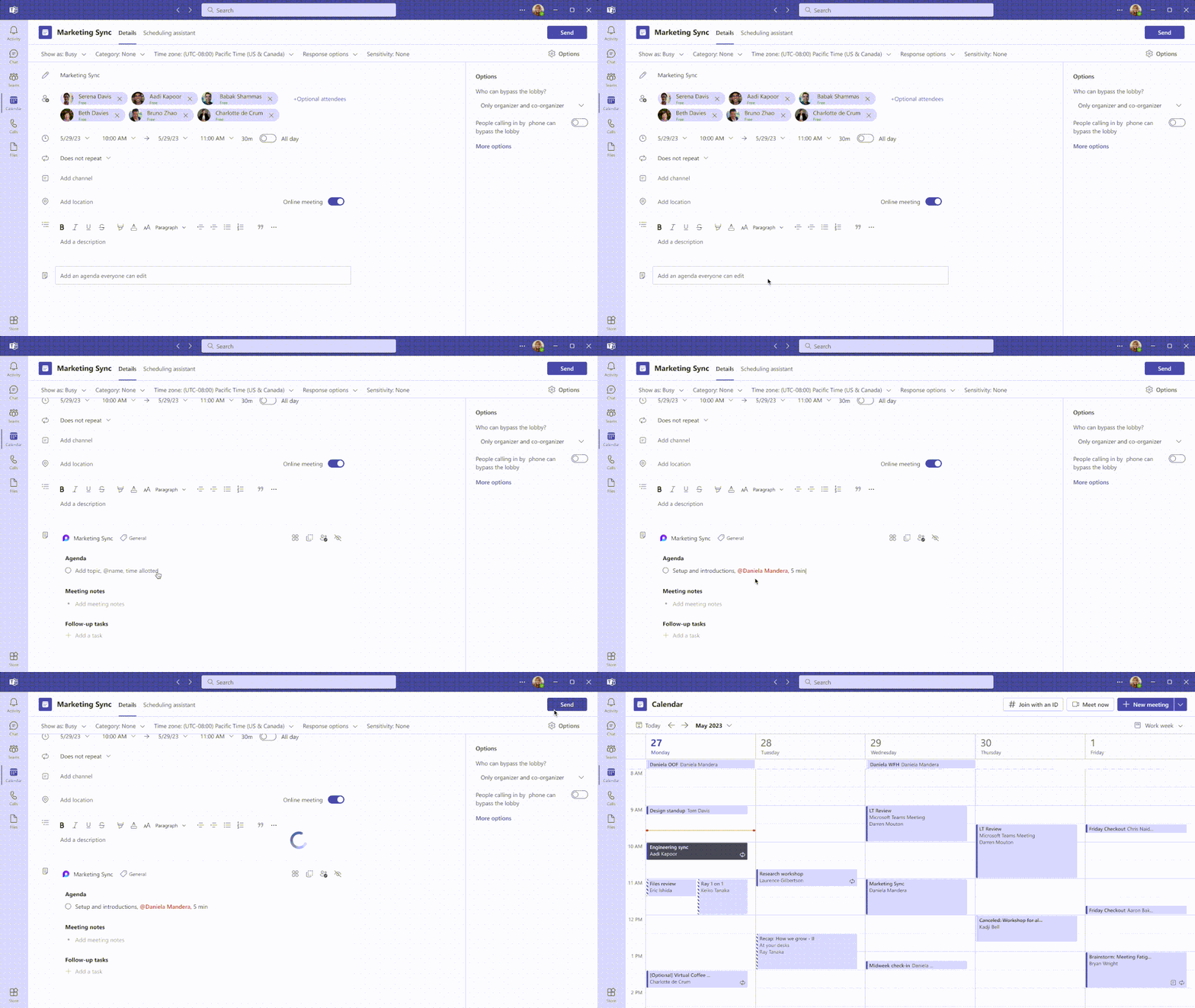
thumbnail image 1 of blog post titled Now in public preview: Collaborative notes in Microsoft Teams Meetings

According to Microsoft:

Collaborative notes eliminate the typical bottleneck of a single note-taker for capturing the agenda and notes and also makes them visible to everyone, improving accuracy and inclusion at every stage of your meeting.

The new feature will help users keep their content synced across Microsoft 365 apps. This means you’ll be able to access them in Outlook, Teams chat, the Loop app, Word for the web, and Whiteboard. This way, if you’d already shared Collaborative notes before initiating a meeting, participants will be able to pitch in and incorporate new ideas and suggestions for brainstorming and better planning purposes. It is worth noting that this can be done from any app the collaborative notes were shared to.

Once the meeting has started, users can continue adding new items to the collaborative notes and even draft or assign tasks to participants. What’s more, keeping track of everything going on is easier. You can also track changes made by clicking on the text to see the user. The notes can be shared even after the meeting to establish continuity.

Users will also be able to transfer the Collaborative notes from the meeting to the Loop app, that’s also currently in public preview. You can now access all your resources in one convenient location. Microsoft has also indicated that it will integrate Loop components with OneNote later in the fall. Ultimately, it will be easier for users to add collaborative meeting notes to their OneNote notebooks.


Related

Share this article:
Previous Article Play EA Sports PGA Tour and 3 more games with Xbox Free Play Days Next Article Forza Motorsport developer Turn 10 is working on a new car game for mobile

Related Articles

Chrome tests Google Drive file uploads in the AI Mode compose box

April 14, 2026
Gemini image creation using right click desktop Chrome

Chrome lets you remake images with Gemini on desktop using just a right-click

April 13, 2026
Samsung Display crosses 5 million QD-OLED monitor shipments as demand grows fast, with new panels and strong premium market expansion worldwide.

Samsung Display Ships 5 Million QD-OLED Monitor Panels in Four Years

April 9, 2026

Leave a Comment Cancel reply

Your email address will not be published. Required fields are marked *

Recent Posts

  • Chrome tests Google Drive file uploads in the AI Mode compose box
  • Chrome lets you remake images with Gemini on desktop using just a right-click
  • Samsung Display Ships 5 Million QD-OLED Monitor Panels in Four Years
  • Intel Arc Pro B70 Teardown Reveals Blower Cooler and Early Board Design Details
  • Users Modify RTX 5090 Lightning Z Hardware to Unlock MSI’s Restricted 2500W BIOS

Recent Comments

  1. XxRIVTYxX on Intel Says It Tried to Help Before Crimson Desert Dropped Arc Support
  2. Gaurav Kumar on Chrome Prepares Nudge to ‘Move Tabs to the Side’ as Vertical Tabs Near Release
OnMSFT.com

The Tech News Site

Categories

  • Windows
  • Surface
  • Xbox
  • How-To
  • OnPodcast
  • Gaming
  • Edge
  • Teams

Recent Posts

  • Chrome tests Google Drive file uploads in the AI Mode compose box
  • Chrome lets you remake images with Gemini on desktop using just a right-click
  • Samsung Display Ships 5 Million QD-OLED Monitor Panels in Four Years
  • Intel Arc Pro B70 Teardown Reveals Blower Cooler and Early Board Design Details
  • Users Modify RTX 5090 Lightning Z Hardware to Unlock MSI’s Restricted 2500W BIOS

Quick Links

  • About OnMSFT.com
  • Contact OnMSFT
  • Join Our Team
  • Privacy Policy
© 2010–2026 OnMSFT.com LLC. All rights reserved.
About OnMSFT.comContact OnMSFTPrivacy Policy
