Skip to content
OnMSFT.com
  • Home
  • About
  • Contact
  • Windows
  • Surface
  • Xbox
  • How-To
  • OnPodcast
  • Edge
  • Teams
  • Gaming
Menu
  • Home
  • About
  • Contact
  • Windows
  • Surface
  • Xbox
  • How-To
  • OnPodcast
  • Edge
  • Teams
  • Gaming
  1. Home
  2. News
  3. Microsoft finally lets users react to comments in Word for Windows

Microsoft finally lets users react to comments in Word for Windows

OnMSFT Staff OnMSFT Staff
June 6, 2023
2 min read

If you’ve collaborated on projects with several users on Microsoft Word, then you know how hard it gets at times to respond to all the comments. And while most comments are usually important and require a response, some comments don’t really need a response. Instead, a reaction would suffice.

Microsoft is now making this possible for Word for Windows users. Just like email reactions in Outlook, users can now like comments in Word to enhance collaboration and productivity in Word.
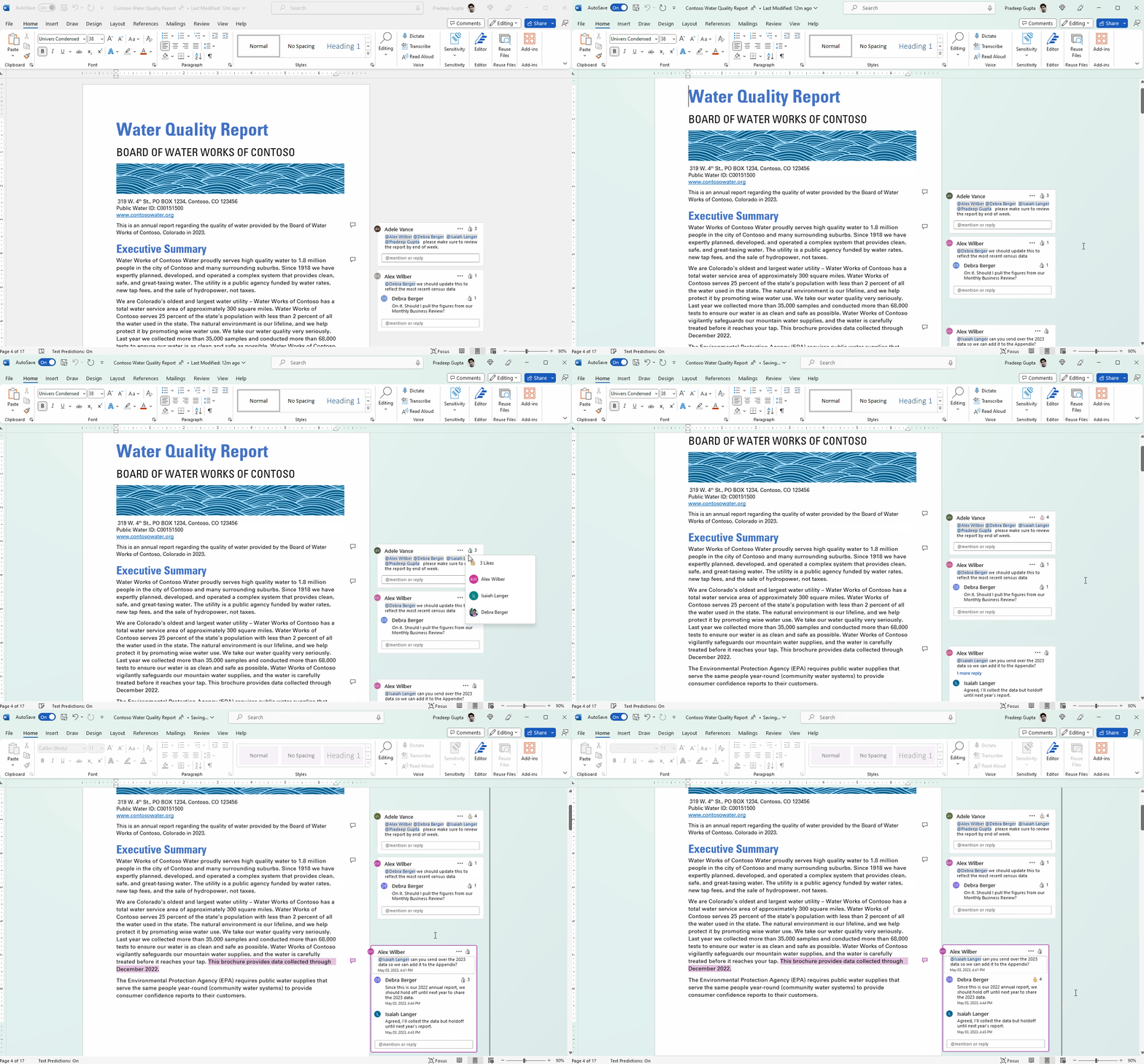
Animation showing liking a comment in a Word for Windows document


And while the Like button in Word is designed to make it easier for users to collaborate on projects and give quick responses, it should be noted that it comes with limitations. For instance, if a document is in read-only mode, you won’t be able to make use of the feature as the Like button won’t be visible.

Additionally, the feature also ships with two known issues. First, the feature will not be available to Android and iOS users. Therefore, they’ll not be able to view comment reactions. Microsoft has also indicated that there might be instances where users might not be able to use comment reactions, especially while editing older documents. Though this doesn’t apply to newer comments added to the document, the feature should work properly.

The feature ships with a dedicated keyboard shortcut, as illustrated below:

  • To react to a comment without using your mouse, navigate to the text in the document with an associated comment and press Alt+F12. From there, press the Tab key to select the Like button. You can press Enter or Spacebar to click the Like button, and then press the Alt+Down arrow keys to expand the user list. Move through the list using the Up and Down arrow keys. The Esc or Alt  keys can be used to dismiss the list.

The feature is now available to all Word for the web users and Beta Channel users and is currently rolling out to Current Channel users in preview. You must be running on version 2305 (Build 16501.20152) or later to access it. The feature will also be rolling out to Mac users in the next couple of weeks.

Related

Share this article:
Previous Article Having issues with Exchange, Outlook, Teams, OneDrive? Microsoft confirms and is currently working on a fix Next Article Microsoft settles with FTC for $20 million over Xbox child data violations

Related Articles

NVIDIA DLSS 5 Hands-On Reveals Big Lighting Changes in Early Demos

March 27, 2026
TSMC 3nm Shortage Gives Apple and NVIDIA a Clear Advantage

TSMC 3nm Shortage Gives Apple and NVIDIA a Clear Advantage

March 27, 2026
Asha Sharma scraps Xbox campaign, leads brand reset, refocuses messaging, signals new direction for consoles, Game Pass, and future strategy changes.

Xbox Chief Asha Sharma Ends ‘This Is an Xbox’ Campaign, Starts Brand Reset

March 27, 2026

Leave a Comment Cancel reply

Your email address will not be published. Required fields are marked *

Recent Posts

  • NVIDIA DLSS 5 Hands-On Reveals Big Lighting Changes in Early Demos
  • TSMC 3nm Shortage Gives Apple and NVIDIA a Clear Advantage
  • Xbox Chief Asha Sharma Ends ‘This Is an Xbox’ Campaign, Starts Brand Reset
  • Jensen Huang Expected at COMPUTEX 2026 as NVIDIA Books Major Taipei Event Space
  • AMD 9950X3D2 launch video flooded with FSR 4 requests for older GPUs

Recent Comments

  1. XxRIVTYxX on Intel Says It Tried to Help Before Crimson Desert Dropped Arc Support
  2. Gaurav Kumar on Chrome Prepares Nudge to ‘Move Tabs to the Side’ as Vertical Tabs Near Release
OnMSFT.com

The Tech News Site

Categories

  • Windows
  • Surface
  • Xbox
  • How-To
  • OnPodcast
  • Gaming
  • Edge
  • Teams

Recent Posts

  • NVIDIA DLSS 5 Hands-On Reveals Big Lighting Changes in Early Demos
  • TSMC 3nm Shortage Gives Apple and NVIDIA a Clear Advantage
  • Xbox Chief Asha Sharma Ends ‘This Is an Xbox’ Campaign, Starts Brand Reset
  • Jensen Huang Expected at COMPUTEX 2026 as NVIDIA Books Major Taipei Event Space
  • AMD 9950X3D2 launch video flooded with FSR 4 requests for older GPUs

Quick Links

  • About OnMSFT.com
  • Contact OnMSFT
  • Join Our Team
  • Privacy Policy
© 2010–2026 OnMSFT.com LLC. All rights reserved.
About OnMSFT.comContact OnMSFTPrivacy Policy