Skip to content
OnMSFT.com
  • Home
  • About
  • Contact
  • News
  • How-to
  • Feature stories
  • Deals
  • Microsoft / office 365
  • Reviews
Menu
  • Home
  • About
  • Contact
  • News
  • How-to
  • Feature stories
  • Deals
  • Microsoft / office 365
  • Reviews
  1. Home
  2. News
  3. PowerToys’ new Mouse Jump utility will improve navigation across big screens

PowerToys’ new Mouse Jump utility will improve navigation across big screens

OnMSFT Staff OnMSFT Staff
February 1, 2023
2 min read

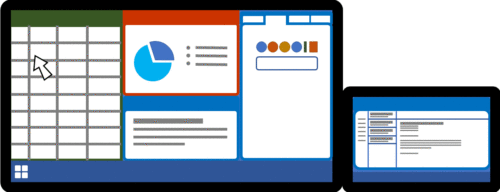
Microsoft is working toward incorporating a neat utility tool dubbed Mouse Jump to PowerToys which is based on FancyMouse. The feature will enhance navigation for users as mouse movements across large and high-resolution screens will be swift rather than having to scroll down several times thus helping you stay on track.

Michael Clayton, the developer further explained that:

On a modern laptop that uses an Ultra-Wide external monitor you could easily have a desktop in the region of 8000+ pixels wide, and that’s a lot of ground for your mouse to cover.

What tends to happen is you end up swiping the physical mouse as far as it will go, then lifting, moving back to the start and swiping again – sometimes half a dozen times just to get to the other side of the screen. During this process you quite often lose track of where the mouse is and spend precious seconds trying to find it again.

The developer further indicated that the utility is “functional and ready” for its first design review, however, there are certain aspects of the tool that still require a bit of refinement before it is released.

To access this feature “a hotkey or spare mouse button can be configured to activate the FancyMouse popup, and the pointer only needs to be moved a tiny amount on the preview thumbnail. A single mouse click then teleports the pointer to that location on the full-size desktop. The visual cue tells you exactly where the pointer will end up so you can find it easily without needing to search for it.”
PowerToys' new Mouse Jump utility will improve navigation across big screens - onmsft.com - February 1, 2023

This feature will probably hit broad availability in the future via an update. Be sure to also check out Microsoft Powertoys’ January update that shipped with self-contained .NET 7 in case you missed it.

via: Neowin

Share this article:
Previous Article Microsoft Edge will let you launch PWAs directly from the address bar Next Article Microsoft to remove over 40 games from the Xbox 360 marketplace next week

Related Articles

Gemini image creation using right click desktop Chrome

Chrome lets you remake images with Gemini on desktop using just a right-click

April 13, 2026
Samsung Display crosses 5 million QD-OLED monitor shipments as demand grows fast, with new panels and strong premium market expansion worldwide.

Samsung Display Ships 5 Million QD-OLED Monitor Panels in Four Years

April 9, 2026
Intel Arc Pro B70 teardown reveals blower cooler design, PCB layout, firmware details, and early insights into Battlemage workstation GPU hardware.

Intel Arc Pro B70 Teardown Reveals Blower Cooler and Early Board Design Details

April 9, 2026

Leave a Comment Cancel reply

Your email address will not be published. Required fields are marked *

Recent Posts

  • Chrome lets you remake images with Gemini on desktop using just a right-click
  • Samsung Display Ships 5 Million QD-OLED Monitor Panels in Four Years
  • Intel Arc Pro B70 Teardown Reveals Blower Cooler and Early Board Design Details
  • Users Modify RTX 5090 Lightning Z Hardware to Unlock MSI’s Restricted 2500W BIOS
  • Intel Arc GPUs Finally Run Crimson Desert After Driver Update, But Issues Remain

Recent Comments

  1. XxRIVTYxX on Intel Says It Tried to Help Before Crimson Desert Dropped Arc Support
  2. Gaurav Kumar on Chrome Prepares Nudge to ‘Move Tabs to the Side’ as Vertical Tabs Near Release
OnMSFT.com

The Tech News Site

Categories

  • Windows
  • Surface
  • Xbox
  • How-To
  • OnPodcast
  • Gaming
  • Edge
  • Teams

Recent Posts

  • Chrome lets you remake images with Gemini on desktop using just a right-click
  • Samsung Display Ships 5 Million QD-OLED Monitor Panels in Four Years
  • Intel Arc Pro B70 Teardown Reveals Blower Cooler and Early Board Design Details
  • Users Modify RTX 5090 Lightning Z Hardware to Unlock MSI’s Restricted 2500W BIOS
  • Intel Arc GPUs Finally Run Crimson Desert After Driver Update, But Issues Remain

Quick Links

  • About OnMSFT.com
  • Contact OnMSFT
  • Join Our Team
  • Privacy Policy
© 2010–2026 OnMSFT.com LLC. All rights reserved.
About OnMSFT.comContact OnMSFTPrivacy Policy

