Skip to content
OnMSFT.com
  • Home
  • About
  • Contact
  • News
  • How-to
  • Feature stories
  • Deals
  • Microsoft / office 365
  • Reviews
Menu
  • Home
  • About
  • Contact
  • News
  • How-to
  • Feature stories
  • Deals
  • Microsoft / office 365
  • Reviews
  1. Home
  2. News
  3. Here’s what’s new in Microsoft Excel (February 2023)

Here’s what’s new in Microsoft Excel (February 2023)

Ron Ron
March 1, 2023
2 min read

In this article

  • Excel for the web
  • Excel for Windows
  • Excel for Mac

If you use Microsoft Excel to stay organized at your workplace, then you’ll be happy to know that Microsoft has unpacked a plethora of new features to the tool to further enhance your productivity.

Here’s everything that was added to Excel in February:

Excel for the web

Microsoft is now making it easier for you to sort out PivotTables and PivotCharts by incorporating manual sorting. The feature was already available for the desktop client but is now shipping to the web.

With this new addition, users will now be able to arrange their PivotTable row and column items based on their preference. This means that you’ll no longer be limited to the standard ascending and descending arrangement. Here’s how it works:
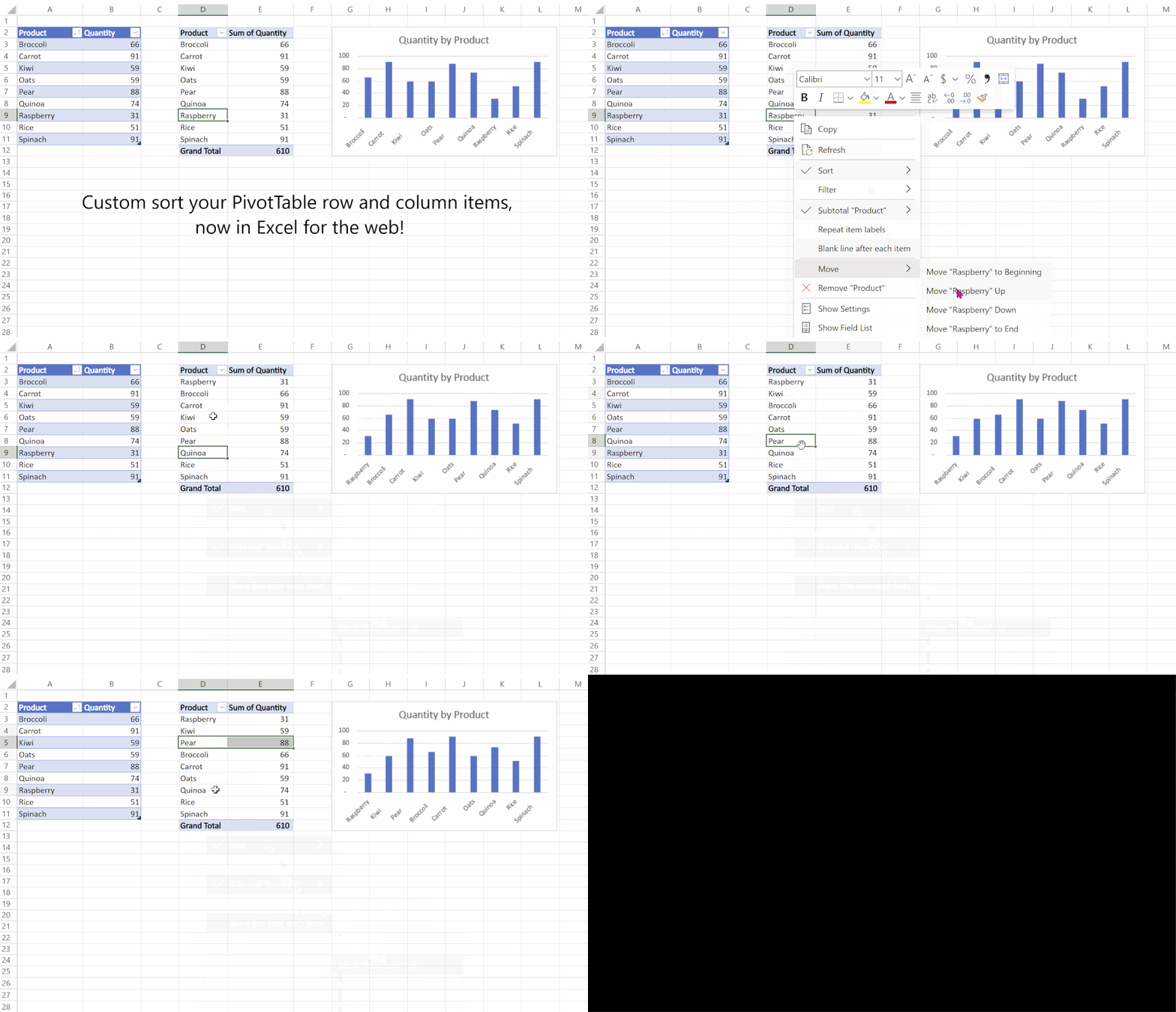
thumbnail image 1 captioned Custom sort your PivotTables and Charts with manual drag and sort

Excel for Windows

First up, Microsoft rolling out a new feature to Windows Insiders that will automate the recalculation process to the active workbook and any of its interdependent workbooks. This way, productivity is enhanced as a lot of time is preserved.

What’s more, the Windows client will also be getting a new feature dubbed Block untrusted XLL Add-Ins. It is designed to add an extra layer of security to worksheets, thus protecting you from malware attacks coming through XLL add-ins. However, it is rolling out to Windows Insiders and is expected to hit general availability soon.

Excel for Mac

Mac users now have access to Power Query Editor which will allow them to author queries from local files, SharePoint, OData, as well as other sources.

thumbnail image 3 captioned Power Query Editor from OData source

What’s more, users will be able to import data from XML and JSON files, OData, SharePoint Online List, Blank Query, and Blank Table. This capability was previously limited to Excel workbooks and Text/CSV files.
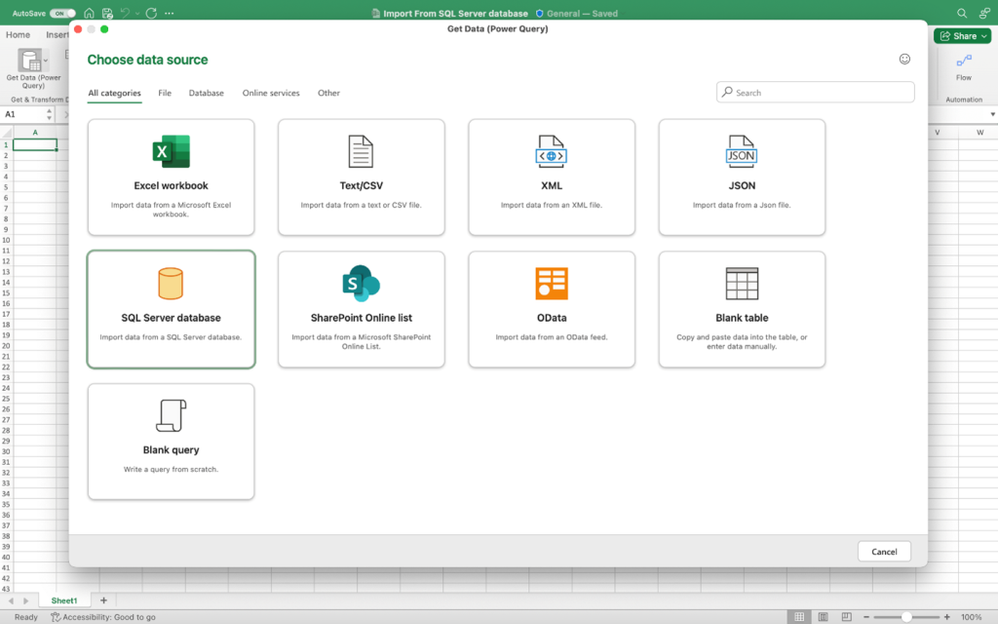
thumbnail image 5 captioned Import data from a SQL Server database

The team at Microsoft Excel also indicated that Mac Insiders now have access to the capability that lets them import data from SQL Server databases using Power Query.

And finally, just like Excel for Windows Insiders, the Automatic Recalculation Optimization feature is also shipping to Mac Insiders.

That’s it for the month of February folks, we invite you to check out January’s recap in case you missed it. Be sure to also check out our expert guide which will help you learn how to document and track changes in Excel.


Share this article:
Previous Article Everything new in Microsoft Teams Premium in February 2023 Next Article Microsoft’s Translator app for iOS gets a refreshed look and other key enhancements

Related Articles

NVIDIA Shader Cache Change Arrives With DDU 18.1.5.1 Update

NVIDIA Shader Cache Change Arrives With DDU 18.1.5.1 Update

April 9, 2026
RTX 4090 burn case surfaces after user’s cat alerts him to smoke, highlighting ongoing concerns around GPU power connector safety issues.

RTX 4090 Burn Incident Reported After User’s Cat Alerts Owner to Smoke

April 9, 2026
Chrome and Gemini integration on Android with AI panel for multi-tab queries

Chrome on Android tests Gemini that can answer questions across multiple tabs

April 9, 2026

Leave a Comment Cancel reply

Your email address will not be published. Required fields are marked *

Recent Posts

  • NVIDIA Shader Cache Change Arrives With DDU 18.1.5.1 Update
  • RTX 4090 Burn Incident Reported After User’s Cat Alerts Owner to Smoke
  • Chrome on Android tests Gemini that can answer questions across multiple tabs
  • Chrome could soon automatically summarize PDFs with Gemini
  • Snapdragon X2 Elite Gaming Shows Real Progress but Still Falls Short for Serious Players

Recent Comments

  1. XxRIVTYxX on Intel Says It Tried to Help Before Crimson Desert Dropped Arc Support
  2. Gaurav Kumar on Chrome Prepares Nudge to ‘Move Tabs to the Side’ as Vertical Tabs Near Release
OnMSFT.com

The Tech News Site

Categories

  • Windows
  • Surface
  • Xbox
  • How-To
  • OnPodcast
  • Gaming
  • Edge
  • Teams

Recent Posts

  • NVIDIA Shader Cache Change Arrives With DDU 18.1.5.1 Update
  • RTX 4090 Burn Incident Reported After User’s Cat Alerts Owner to Smoke
  • Chrome on Android tests Gemini that can answer questions across multiple tabs
  • Chrome could soon automatically summarize PDFs with Gemini
  • Snapdragon X2 Elite Gaming Shows Real Progress but Still Falls Short for Serious Players

Quick Links

  • About OnMSFT.com
  • Contact OnMSFT
  • Join Our Team
  • Privacy Policy
© 2010–2026 OnMSFT.com LLC. All rights reserved.
About OnMSFT.comContact OnMSFTPrivacy Policy