Skip to content
OnMSFT.com
  • Home
  • About
  • Contact
  • Windows
  • Surface
  • Xbox
  • How-To
  • OnPodcast
  • Edge
  • Teams
  • Gaming
Menu
  • Home
  • About
  • Contact
  • Windows
  • Surface
  • Xbox
  • How-To
  • OnPodcast
  • Edge
  • Teams
  • Gaming
  1. Home
  2. Microsoft unveils Learning Accelerators for better personalized learning

Microsoft unveils Learning Accelerators for better personalized learning

admin admin
February 9, 2023
3 min read

\n

Following a turbulent two years of pandemic induced educational reforms, teachers are looking at an expanded set of student needs that can require more tools than ever to deliver unique and personalized learning experiences, enter Microsoft’s Learning Accelerators.

\n

During its Microsoft Reimagine Education 2023 event, the company introduced its Learning Accelerators tools which aim to streamline the creative, review and analysis processes for teachers as they track individual student progress.

\n

Learning Accelerators include both Coach tools and Progress tools. The Coach tools provide students real-time coaching and opportunities for self-directed learning. The Progress tools are designed to help teachers personalize assignments as well as feedback and instruction assisted by actionable insights. The tools help schools unlock the full potential of every student in a secure and inclusive environment.

\n

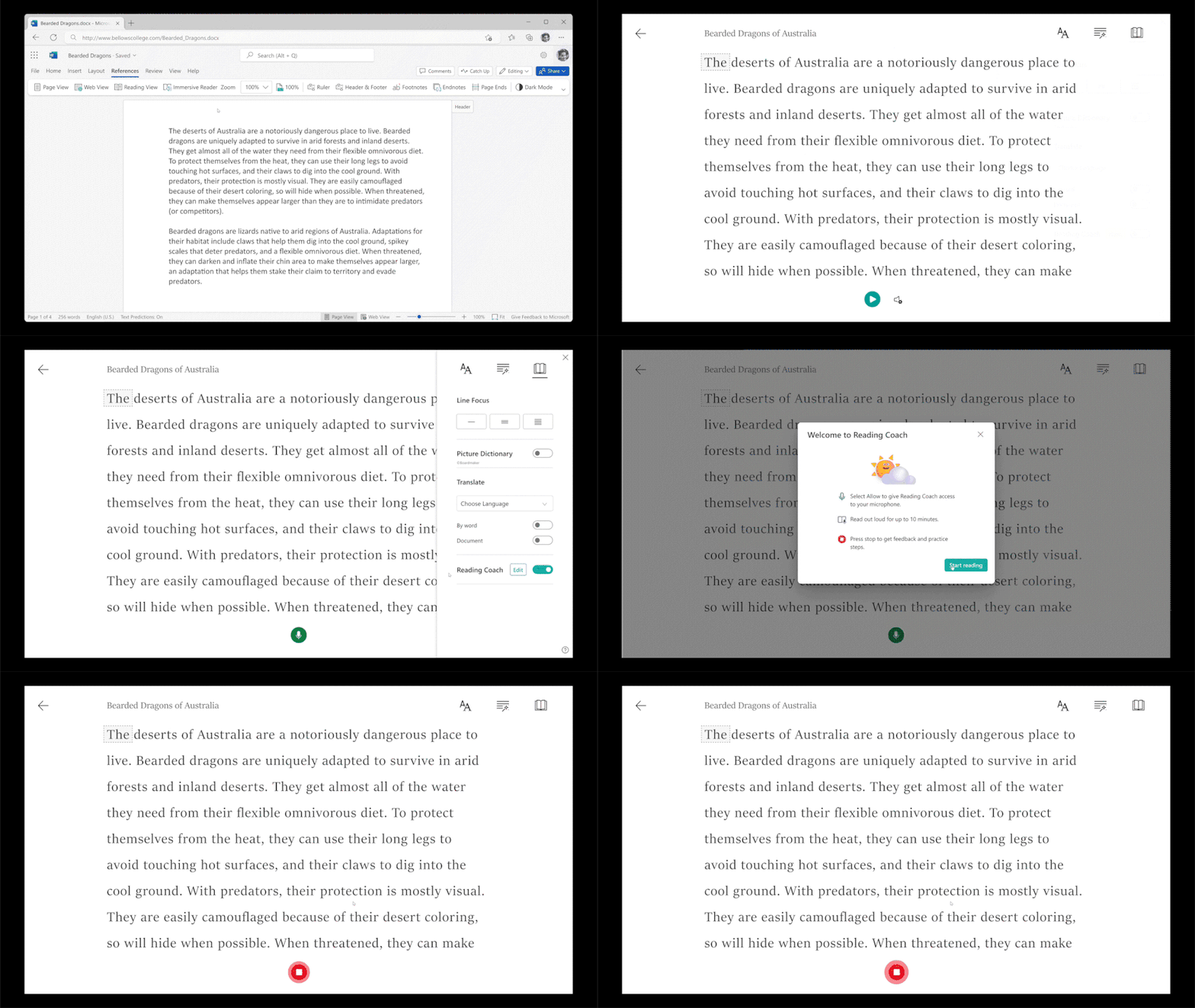
For clarity, the Coach and Progress tool works in tandem to help encourage the growth of student’s abilities and Microsoft plans to add Comprehension questions to its Reading Coach and Reading Progress tools within the current Immersive Reader tool.

\n

\n

\n

\n

\n

\n

\n
\n

\n

\n

\n

\n

\n

\n

Microsoft Reading Coach

\n

Students can find Immersive Reader across Word Online, OneNote, Microsoft Teams Assignments, Flip, and even in Minecraft Education. Reading Coach and Reading Progress are readily available in over 116 languages with new inclusivity highlights developed in.

\n

Microsoft hasn’t specified a specific date, but notes it’s coming “soon.”

\n

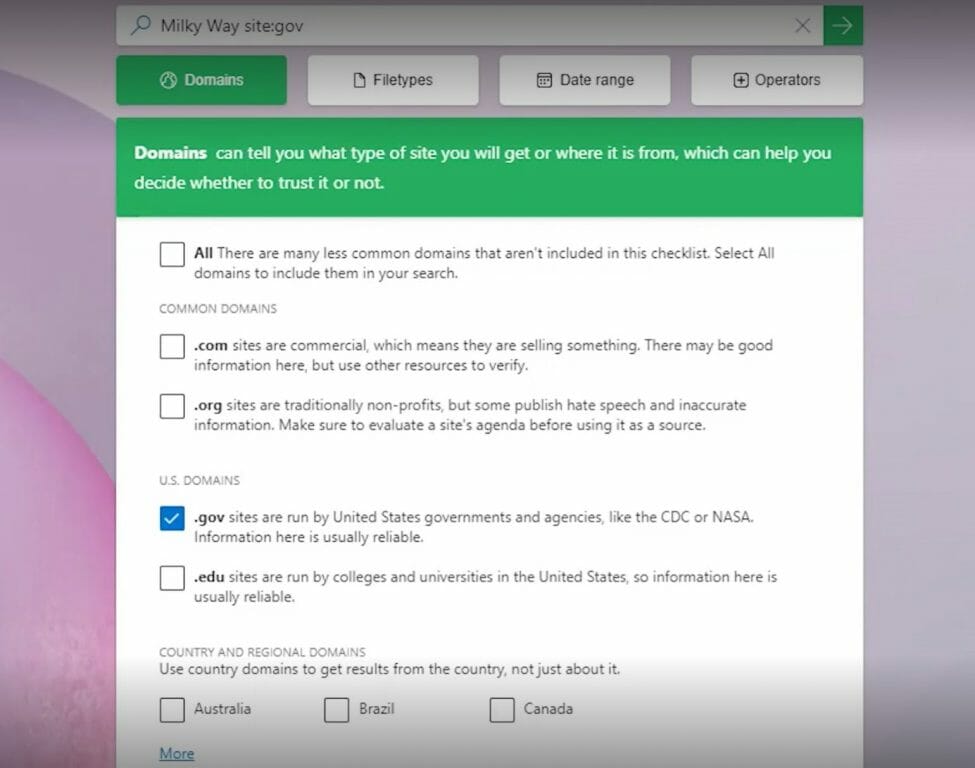
Microsoft is also looking to bolster Information Literacy to help students discern facts from opinions with Search Coach and Search Progress. Search Coach and Search Progress aim to provide real-time coaching to students on how to form efficient queries while also determining reliable sources and content in an ad-free online environment.

\n
Speaker Coach Sampler

\n

\n

\n

\n

\n

\n

\n

\n

\n

\n

\n

\n

\n

\n

Teachers will have access to search insights to help them form more personalized information literacy for students as they develop fundamental behaviors for navigating online information.

\n

Microsoft Bing SafeSearch is enabled by default, so students only see sites that go through a filter that blocks adult content from search results. Students can practice concepts and work on building their information literacy skills in a secure, educational environment.

\n

    \n

  • Real-time coaching to students on forming effective queries as well as identifying and reviewing reliable sources.
  • \n

  • Daily search tips and targeted tips included on the results page, filter options that help students find relevant sources, and much more.
  • \n

  • Customizable filers that teachers can easily set for personalized lessons and students can use to make their searches more specific for additional independent practice on certain concepts.
  • \n

  • Optional filters like a Fact Check button that can be enabled by the teacher to encourage students to review sources with some of the top fact checking websites and an option for teachers to create their own list of sites for students to use.
  • \n

\n

\n

Microsoft also introduced Speaker Coach and Speaker Progress which look to improve a student’s ability to present information. Students can access in English within Microsoft PowerPoint, Microsoft Teams and LinkedIn with Microsoft looking to put it in Teams Assignments for the 2023-2024 school year.

\n

Speaker Coach evaluates and provides real-time feedback on a student’s pacing, pitch, use of words and vocabulary while the Speaker Progress tool aids a teacher in creating and reviewing speech assignments for both the classroom and individual students.

\n

A new Math Coach tool was introduced that will help break down each part of a math problem with text explanations for each step and operation while the Math Progress tool will help teachers generate more personalized practice questions as they identify concepts students find challenging. Match Coach and Math Progress will be avialian preview for the 2023-2024 school year.

\n

Lastly, Microsoft talked about Education Insights Premium coming to all versions of Microsoft 365 Education as well as the no-cost offering of Office 365. Students using Windows 11 will now be aided with a new simple sign-in feature for Windows 11 Pro Education that supports third party providers such as Clever and Google, later this month.

\n\n

Share this article:
Previous Article How to change the default browser on Windows 11 and why it’s important that you do Next Article Blizzard unveils its official Diablo cookbook with over 60 recipes

Related Articles

PowerToys 0.75 released; Environment Variables editor is here

October 31, 2023

Former Halo developer Bungie announces layoffs in wake of game delays

October 31, 2023

Siemens and Microsoft partner to bring GenAI to industries worldwide

October 31, 2023

Leave a Comment Cancel reply

Your email address will not be published. Required fields are marked *

Recent Posts

  • PowerToys 0.75 released; Environment Variables editor is here
  • Former Halo developer Bungie announces layoffs in wake of game delays
  • Siemens and Microsoft partner to bring GenAI to industries worldwide
  • 43 Microsoft Edge keyboard shortcuts to remember for stylish and speedy web surfing
  • Here is what’s coming to (and leaving) Xbox Game Pass soon

Recent Comments

No comments to show.

Archives

  • October 2023
  • September 2023
  • August 2023
  • July 2023
  • June 2023
  • May 2023
  • April 2023
  • March 2023
  • February 2023
  • January 2023
  • December 2022
  • November 2022
  • October 2022
  • September 2022
  • August 2022
  • July 2022
  • June 2022
  • May 2022
  • April 2022
  • March 2022
  • February 2022
  • January 2022
  • December 2021
  • November 2021
  • October 2021
  • September 2021
  • August 2021
  • July 2021
  • June 2021
  • May 2021
  • April 2021
  • March 2021
  • February 2021
  • January 2021
  • December 2020
  • November 2020
  • October 2020
  • September 2020
  • August 2020
  • July 2020
  • June 2020
  • May 2020
  • April 2020
  • March 2020
  • February 2020
  • January 2020
  • December 2019
  • November 2019
  • October 2019
  • September 2019
  • August 2019
  • July 2019
  • June 2019
  • May 2019
  • April 2019
  • March 2019
  • February 2019
  • January 2019
  • December 2018
  • November 2018
  • October 2018
  • September 2018
  • August 2018
  • July 2018
  • June 2018
  • May 2018
  • April 2018
  • March 2018
  • February 2018
  • January 2018
  • December 2017
  • November 2017
  • October 2017
  • September 2017
  • August 2017
  • July 2017
  • June 2017
  • May 2017
  • April 2017
  • March 2017
  • February 2017
  • January 2017
  • December 2016
  • November 2016
  • October 2016
  • September 2016
  • August 2016
  • July 2016
  • June 2016
  • May 2016
  • April 2016
  • March 2016
  • February 2016
  • January 2016
  • December 2015
  • November 2015
  • October 2015
  • September 2015
  • August 2015
  • July 2015
  • June 2015
  • May 2015
  • April 2015
  • March 2015
  • February 2015
  • January 2015
  • December 2014
  • November 2014
  • October 2014
  • September 2014
  • August 2014
  • July 2014
  • June 2014
  • May 2014
  • April 2014
  • March 2014
  • February 2014
  • January 2014
  • December 2013
  • November 2013
  • October 2013
  • September 2013
  • August 2013
  • July 2013
  • June 2013
  • May 2013
  • April 2013
  • March 2013
  • February 2013
  • January 2013
  • December 2012
  • November 2012
  • October 2012
  • September 2012
  • August 2012
  • July 2012
  • June 2012
  • May 2012
  • April 2012
  • March 2012
  • February 2012
  • January 2012
  • December 2011
  • November 2011
  • October 2011
  • September 2011
  • August 2011
  • July 2011
  • June 2011
  • May 2011
  • April 2011
  • March 2011
  • February 2011
  • January 2011
  • December 2010
  • November 2010
  • October 2010
  • September 2010

Categories

  • Announcements
  • Deals
  • Developer
  • Editorial
  • Feature
  • Feature stories
  • Hero-post
  • Hotdeals
  • How-to
  • Latest news
  • Microsoft / office 365
  • News
  • Office 365
  • Onpodcast
  • Opinion
  • Our featured post
  • Polls
  • Review
  • Reviews
  • Videos
OnMSFT.com

OnMSFT.com covers Microsoft news, reviews, and how-to guides. Formerly known as WinBeta, we have been your source for Microsoft news since 1998.

Categories

  • Windows
  • Surface
  • Xbox
  • How-To
  • OnPodcast
  • Gaming
  • Edge
  • Teams

Recent Posts

  • PowerToys 0.75 released; Environment Variables editor is here
  • Former Halo developer Bungie announces layoffs in wake of game delays
  • Siemens and Microsoft partner to bring GenAI to industries worldwide
  • 43 Microsoft Edge keyboard shortcuts to remember for stylish and speedy web surfing
  • Here is what’s coming to (and leaving) Xbox Game Pass soon

Quick Links

  • About OnMSFT.com
  • Contact OnMSFT
  • Join Our Team
© 2010–2026 OnMSFT.com LLC. All rights reserved.
About OnMSFT.comContact OnMSFT