Skip to content
OnMSFT.com
  • Home
  • About
  • Contact
  • Windows
  • Surface
  • Xbox
  • How-To
  • OnPodcast
  • Edge
  • Teams
  • Gaming
Menu
  • Home
  • About
  • Contact
  • Windows
  • Surface
  • Xbox
  • How-To
  • OnPodcast
  • Edge
  • Teams
  • Gaming
  1. Home
  2. News
  3. Microsoft To Do brings intelligent task suggestions to My Day on the web

Microsoft To Do brings intelligent task suggestions to My Day on the web

Rabia Noureen Rabia Noureen
January 21, 2021
2 min read

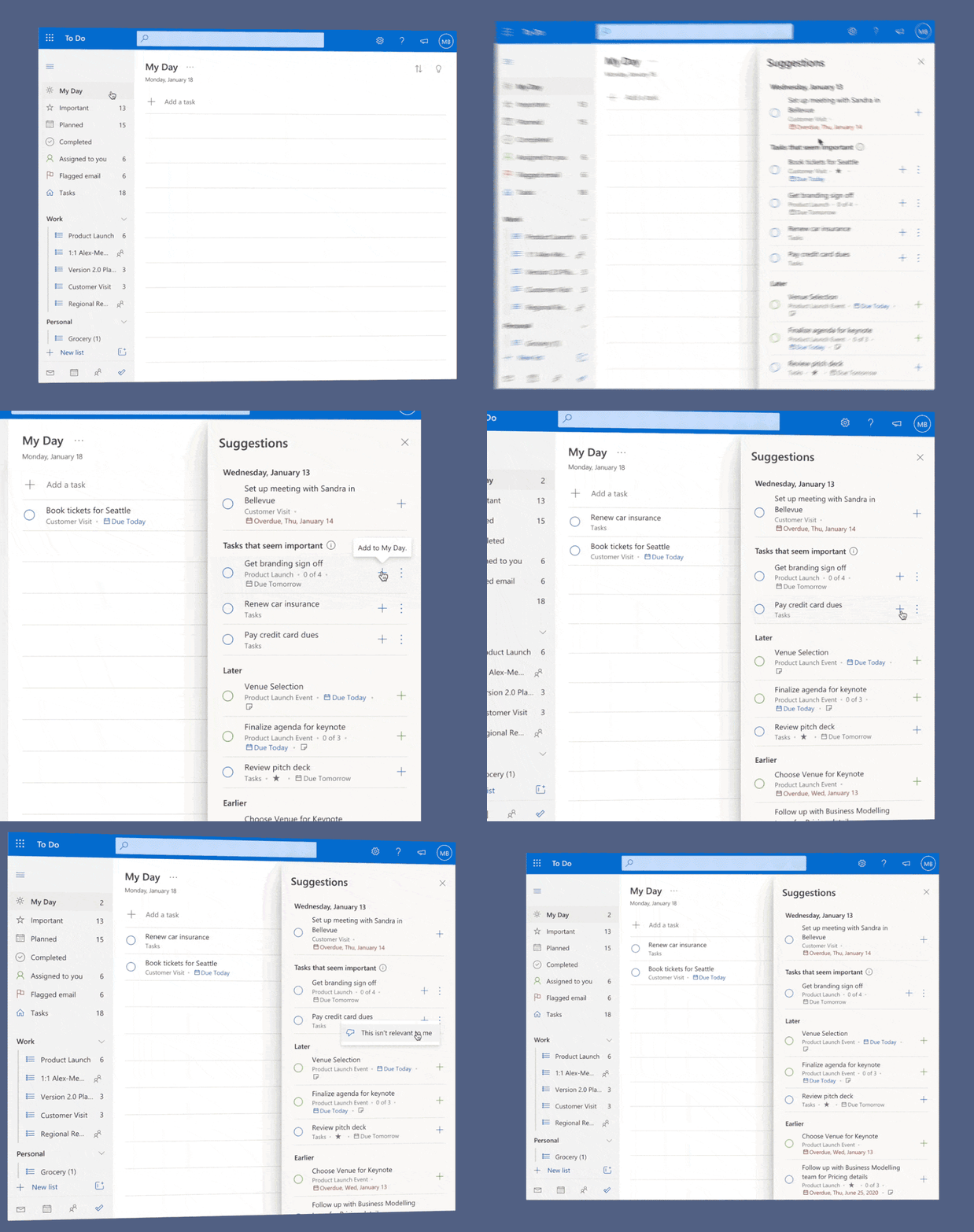
Microsoft has released an update for its Microsoft To Do app on the web. The main new feature in this update is the addition of AI-powered task suggestions in the My Day view that allow users to get quick access to important tasks on their lists, separating them from others and making it easier to prioritize them. These suggestions essentially include To-Do tasks that have deadlines and are marked important by the user itself.

“We’ll show up to seven tasks we identify as most relevant to you in this section. It’ll update as you add new tasks or edit existing ones. Your urgent tasks, like ones due today or tomorrow or the ones that are overdue, will show up here. All other tasks with due dates will continue to show up in the Later and Earlier sections of the suggestions pane” the Microsoft To Do team explained.
thumbnail image 1 of blog post titled Focus on what matters with AI in To Do

To get started with intelligent suggestions, head to the Microsoft To Do web app and click the My Day list. In the suggestions pane, users will see a newly added section called “Tasks that seem important.” This should make it easier for them to identify important tasks and add them to their My Day list. There is also the ability to mark specific entries as irrelevant by selecting select more options > This isn’t relevant to me.

Keep in mind that the feature is available to English-speaking users for now. Moreover, the Tasks that seem important section still doesn’t include Planner tasks, though bringing this information right to the suggestions pane could have its advantages.  Do you think this is an interesting addition, and it will help to boost your productivity? Sound off in the comments below.
Share This Post:

Tags: Microsoft To Do
Share this article:
Tags:
Microsoft To Do
Previous Article Microsoft starts testing new Xbox features without requiring full OS updates Next Article Microsoft Edge 88 reaches the Stable channel this week, here’s what’s new

Related Articles

3- HP USB-C Travel Hub » On MSFT

March 1, 2026

Microsoft treats Windows Phone owners with extra 20GB of free SkyDrive storage for one year

March 1, 2026

SoundByte phone 4 » On MSFT

March 1, 2026

Leave a Comment Cancel reply

Your email address will not be published. Required fields are marked *

Recent Posts

  • 3- HP USB-C Travel Hub » On MSFT
  • Microsoft treats Windows Phone owners with extra 20GB of free SkyDrive storage for one year
  • Hello world!
  • SoundByte phone 4 » On MSFT
  • SoundByte phone 3 » On MSFT

Recent Comments

  1. A WordPress Commenter on Hello world!

Archives

  • March 2026
  • December 2022
  • November 2022
  • October 2022
  • September 2022
  • August 2022
  • July 2022
  • June 2022
  • May 2022
  • April 2022
  • March 2022
  • February 2022
  • January 2022
  • December 2021
  • November 2021
  • October 2021
  • September 2021
  • August 2021
  • July 2021
  • June 2021
  • May 2021
  • April 2021
  • March 2021
  • February 2021
  • January 2021
  • December 2020
  • November 2020
  • October 2020
  • September 2020
  • August 2020
  • July 2020
  • June 2020
  • May 2020
  • April 2020
  • March 2020
  • February 2020
  • January 2020
  • December 2019
  • November 2019
  • October 2019
  • September 2019
  • August 2019
  • July 2019
  • June 2019
  • May 2019
  • April 2019
  • March 2019
  • February 2019
  • January 2019
  • December 2018
  • November 2018
  • October 2018
  • September 2018
  • August 2018
  • July 2018
  • June 2018
  • May 2018
  • April 2018
  • March 2018
  • February 2018
  • January 2018
  • December 2017
  • November 2017
  • October 2017
  • September 2017
  • August 2017
  • July 2017
  • June 2017
  • May 2017
  • April 2017
  • March 2017
  • February 2017
  • January 2017
  • December 2016
  • November 2016
  • October 2016
  • September 2016
  • August 2016
  • July 2016
  • June 2016
  • May 2016
  • April 2016
  • March 2016
  • February 2016
  • January 2016
  • December 2015
  • November 2015
  • October 2015
  • September 2015
  • August 2015
  • July 2015
  • June 2015
  • May 2015
  • April 2015
  • March 2015
  • February 2015
  • January 2015
  • December 2014
  • November 2014
  • October 2014
  • September 2014
  • August 2014
  • July 2014
  • June 2014
  • May 2014
  • April 2014
  • March 2014
  • February 2014
  • January 2014
  • December 2013
  • November 2013
  • October 2013
  • September 2013
  • August 2013
  • July 2013
  • June 2013
  • May 2013
  • April 2013
  • March 2013
  • February 2013
  • January 2013
  • December 2012
  • November 2012
  • October 2012
  • September 2012
  • August 2012
  • July 2012
  • June 2012
  • May 2012
  • April 2012
  • March 2012
  • February 2012
  • January 2012
  • December 2011
  • November 2011
  • October 2011
  • September 2011
  • August 2011
  • July 2011
  • June 2011
  • May 2011
  • April 2011
  • March 2011
  • February 2011
  • January 2011
  • December 2010
  • November 2010
  • October 2010
  • September 2010

Categories

  • Announcements
  • Deals
  • Developer
  • Editorial
  • Feature
  • Feature stories
  • Hero-post
  • Hotdeals
  • How-to
  • Latest news
  • Microsoft / office 365
  • News
  • Office 365
  • Onpodcast
  • Opinion
  • Our featured post
  • Polls
  • Review
  • Reviews
  • Uncategorized
  • Videos
OnMSFT.com

OnMSFT.com covers Microsoft news, reviews, and how-to guides. Formerly known as WinBeta, we have been your source for Microsoft news since 1998.

Categories

  • Windows
  • Surface
  • Xbox
  • How-To
  • OnPodcast
  • Gaming
  • Edge
  • Teams

Recent Posts

  • 3- HP USB-C Travel Hub » On MSFT
  • Microsoft treats Windows Phone owners with extra 20GB of free SkyDrive storage for one year
  • Hello world!
  • SoundByte phone 4 » On MSFT
  • SoundByte phone 3 » On MSFT

Quick Links

  • About OnMSFT.com
  • Contact OnMSFT
  • Join Our Team
© 2010–2026 OnMSFT.com LLC. All rights reserved.
About OnMSFT.comContact OnMSFT