Skip to content
OnMSFT.com
  • Home
  • About
  • Contact
  • Windows
  • Surface
  • Xbox
  • How-To
  • OnPodcast
  • Edge
  • Teams
  • Gaming
Menu
  • Home
  • About
  • Contact
  • Windows
  • Surface
  • Xbox
  • How-To
  • OnPodcast
  • Edge
  • Teams
  • Gaming
  1. Home
  2. News
  3. Microsoft Teams public preview adds option to Spotlight up to 7 participants during meetings – OnMSFT.com

Microsoft Teams public preview adds option to Spotlight up to 7 participants during meetings – OnMSFT.com

Rabia Noureen Rabia Noureen
May 19, 2021
2 min read

In September, Microsoft Teams released a new Spotlight feature that lets presenters pin the video feed of a specific participant in a meeting. Now, the company is planning to expand the Spotlighting experience in Teams by adding the ability to lock multiple participants at a time.

As noted by Microsoft MVP Vesa Nopanen on LinkedIn, Microsoft Teams public preview has recently received a new update that lets presenters and organizers spotlight up to 7 participants simultaneously for everyone to see during meetings. This capability is available on all major platforms, including Windows, Mac, iOS, Android, and on the web.
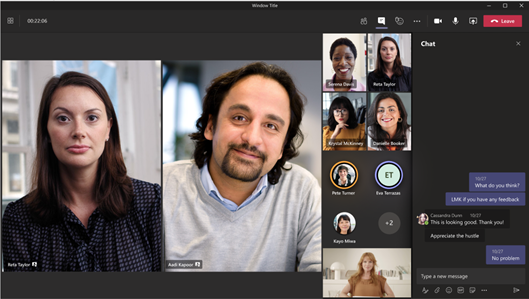
Spotlight select individuals

To spotlight a video on Teams on the desktop, presenters will need to right-click the person’s video feed and choose “Spotlight” from the context menu. In addition, they can also head to the participant roster, find the participant they want to spotlight, and then click the ‘Spotlight’ option available in the ellipsis menu (…). The same process should be repeated for all (up to 7) participants.

Presenters will be able to stop individual spotlights or stop all spotlights in bulk from the roster. This feature is also available on mobile (as shown below).

Microsoft Teams public preview adds option to Spotlight up to 7 participants during meetings OnMSFT.com May 19, 2021

It is important to note that the new Spotlight experience is beginning to roll out to all users globally, and to try out this feature; your tenant needs to be on the public preview version of Teams. Once that’s set up, the new multiple Spotlights option will be enabled by default during meetings. The firm is also working to bring other useful features for business and education customers, including custom Together Mode scenes for meetings.


Share This Post:

Share this article:
Tags:
Microsoft 365 Microsoft Teams
Previous Article Xbox Series X and Windows 10 pre-orders for The Ascent go live, 2021 release date announced – OnMSFT.com Next Article Google I/O 2021 refines ideas on security and privacy

Related Articles

GPT 5.3

OpenAI GPT-5.3 Instant released, when will you get it, and benchmarks

March 3, 2026
Gemini 3.1

Claude is down, but Gemini 3.1 Flash-Lite is rolling out right now

March 3, 2026
MacBook Pro M5 Pro

Apple March Event Live: M5 Pro, M5 Mac, MacBook Air, MacBook Pro, and new Studio Displays

March 3, 2026

Leave a Comment Cancel reply

Your email address will not be published. Required fields are marked *

Recent Posts

  • OpenAI GPT-5.3 Instant released, when will you get it, and benchmarks
  • MSFT stock price today: Microsoft shares rise, investors watch AI execution
  • Claude is down, but Gemini 3.1 Flash-Lite is rolling out right now
  • Apple March Event Live: M5 Pro, M5 Mac, MacBook Air, MacBook Pro, and new Studio Displays
  • Is the Mac mini M5 launching today? Here’s everything you need to know

Recent Comments

No comments to show.
OnMSFT.com

OnMSFT.com covers Microsoft news, reviews, and how-to guides. Formerly known as WinBeta, we have been your source for Microsoft news since 1998.

Categories

  • Windows
  • Surface
  • Xbox
  • How-To
  • OnPodcast
  • Gaming
  • Edge
  • Teams

Recent Posts

  • OpenAI GPT-5.3 Instant released, when will you get it, and benchmarks
  • MSFT stock price today: Microsoft shares rise, investors watch AI execution
  • Claude is down, but Gemini 3.1 Flash-Lite is rolling out right now
  • Apple March Event Live: M5 Pro, M5 Mac, MacBook Air, MacBook Pro, and new Studio Displays
  • Is the Mac mini M5 launching today? Here's everything you need to know

Quick Links

  • About OnMSFT.com
  • Contact OnMSFT
  • Join Our Team
  • Privacy Policy
© 2010–2026 OnMSFT.com LLC. All rights reserved.
About OnMSFT.comContact OnMSFTPrivacy Policy
