Skip to content
OnMSFT.com
  • Home
  • About
  • Contact
  • News
  • How-to
  • Feature stories
  • Deals
  • Microsoft / office 365
  • Reviews
Menu
  • Home
  • About
  • Contact
  • News
  • How-to
  • Feature stories
  • Deals
  • Microsoft / office 365
  • Reviews
  1. Home
  2. News
  3. Green screen background for Teams now in Public Preview

Green screen background for Teams now in Public Preview

Kevin Okemwa Kevin Okemwa
April 3, 2023
2 min read

Microsoft announced that the green screen background feature in Teams meetings has finally hit public preview. The feature is designed to provide users with “an enhanced virtual background effect that improves the sharpness and definition around your face, head, ears, and hair.”

In order to make use of this feature properly, there must be a solid color screen or clean background wall in the background. It should also be plain and without any irregularities or stains. This helps in defining clarity when a user has a prop or object in hand and would like other meeting participants to see it.

To access the feature, you’ll need to join a Teams meeting and click the More icon in the meeting toolbar, and then select Video effects. Then, select the Green Screen Settings link under Backgrounds on the Video effects page.

Next, turn on the Green Screen toggle under Camera. You can then manually pick a backdrop color by clicking on the backdrop icon in the bottom right corner of the Preview window.
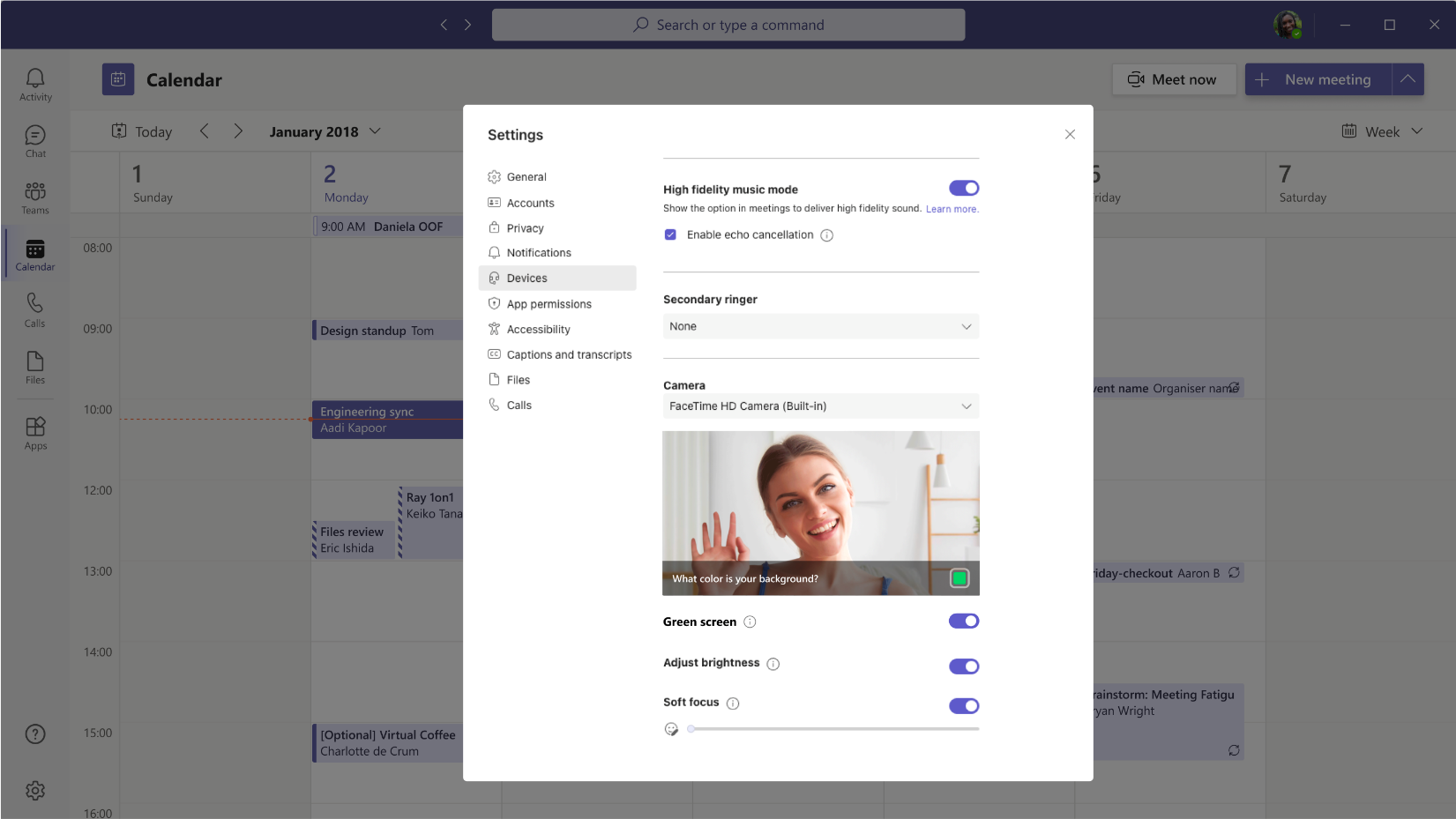
Settings page with Green screen toggle turned on

However, the feature ships with several known issues. First, it’s only supported on Windows and macOS devices with Intel chips, this means that Mac M1/M2 devices aren’t supported.

Next up, it automatically disables background blur and Together Mode, though it works well with other Presenter modes such as Standout, Side-by-Side and Reporter, PowerPoint Live Standout, and background replacement (JPEG/PNG).

Additionally, the feature doesn’t detect small objects properly. It also doesn’t produce a good green screen effect when using transparent or translucent objects.

The feature is currently rolling out to members part of the Teams Public Preview, and use Windows or macOS Teams client. In related news, Microsoft also launched a new Teams app for Windows that’s faster, smarter, more flexible, and more intelligent.

Avatars for Teams is also available in public preview thus allowing users to bypass the need to be on camera or to possess a webcam when joining meetings.

Share this article:
Previous Article Bing Chat gets image and video search, better local grounding, and more Next Article New, cheaper Western Digital Xbox Series X|S expansion cards coming soon

Related Articles

Gemini in Chrome side panel showing PDF summary options alongside an open document

Chrome could soon automatically summarize PDFs with Gemini

April 8, 2026

Snapdragon X2 Elite Gaming Shows Real Progress but Still Falls Short for Serious Players

April 8, 2026

ASUS Says No New Motherboards Needed for Intel Core Ultra 200S Plus

April 8, 2026

Leave a Comment Cancel reply

Your email address will not be published. Required fields are marked *

Recent Posts

  • Chrome could soon automatically summarize PDFs with Gemini
  • Snapdragon X2 Elite Gaming Shows Real Progress but Still Falls Short for Serious Players
  • ASUS Says No New Motherboards Needed for Intel Core Ultra 200S Plus
  • Google is Killing Chrome’s Link Preview Feature from Desktop
  • ASUS Snapdragon X2 Laptops Get Sudden Price Increase After Reviews

Recent Comments

  1. XxRIVTYxX on Intel Says It Tried to Help Before Crimson Desert Dropped Arc Support
  2. Gaurav Kumar on Chrome Prepares Nudge to ‘Move Tabs to the Side’ as Vertical Tabs Near Release
OnMSFT.com

The Tech News Site

Categories

  • Windows
  • Surface
  • Xbox
  • How-To
  • OnPodcast
  • Gaming
  • Edge
  • Teams

Recent Posts

  • Chrome could soon automatically summarize PDFs with Gemini
  • Snapdragon X2 Elite Gaming Shows Real Progress but Still Falls Short for Serious Players
  • ASUS Says No New Motherboards Needed for Intel Core Ultra 200S Plus
  • Google is Killing Chrome's Link Preview Feature from Desktop
  • ASUS Snapdragon X2 Laptops Get Sudden Price Increase After Reviews

Quick Links

  • About OnMSFT.com
  • Contact OnMSFT
  • Join Our Team
  • Privacy Policy
© 2010–2026 OnMSFT.com LLC. All rights reserved.
About OnMSFT.comContact OnMSFTPrivacy Policy
