Skip to content
OnMSFT.com
  • Home
  • About
  • Contact
  • Windows
  • Surface
  • Xbox
  • How-To
  • OnPodcast
  • Edge
  • Teams
  • Gaming
Menu
  • Home
  • About
  • Contact
  • Windows
  • Surface
  • Xbox
  • How-To
  • OnPodcast
  • Edge
  • Teams
  • Gaming
  1. Home
  2. How-to
  3. How to get Bing Chat to provide better research paper search results

How to get Bing Chat to provide better research paper search results

admin admin
April 3, 2023
3 min read

\n

\n

\n

In this article

\n

\n

    • What is Bing Chat?
    • How to access Bing Chat?
  • How to use Bing Chat to provide better research paper search results

\n

Microsoft has integrated its Bing Search Engine with ChatGPT, effectively combining the strengths of both platforms. The merged version, Bing Chat, delivers accurate answers while displaying relevant search results simultaneously. One Redditor offered some tips on getting better Bing Chat results and how to leverage the platform for more effective research paper searches. Here’s what we learned:

\n

What is Bing Chat?

\n

Bing Chat is an artificial intelligence-enabled chatbot that comprehends the nuances of your inquiry and provides human-like responses. Microsoft has efficiently integrated this attribute into its Bing Search platform, making it a comprehensive solution for search inquiries and AI-driven responses. The rollout of Microsoft’s Bing AI is currently underway for all users, following its initial introduction as a limited beta feature. Initially, a waitlist was in place for users to access the AI-powered chatbot, comparable to the popular ChatGPT chatbot.

\n

How to access Bing Chat?

\n

Proper login authentication requires you to have a valid Microsoft ID. For new users, the prompt to join the wishlist might still appear. If you choose to join, logging in with your Microsoft ID will allow you to obtain fast access. It’s worth noting that some users have received access to Bing Chat roughly two weeks after joining the waitlist.

\n

\n

\n

\n

\n

\n

\n

\n

\n

\n

\n

\n

\n

\n

Here’s how to access the chatbot:

\n

    \n

  • Open The New Bing and select Chat.
  • \n

\n

Bing chat

\n

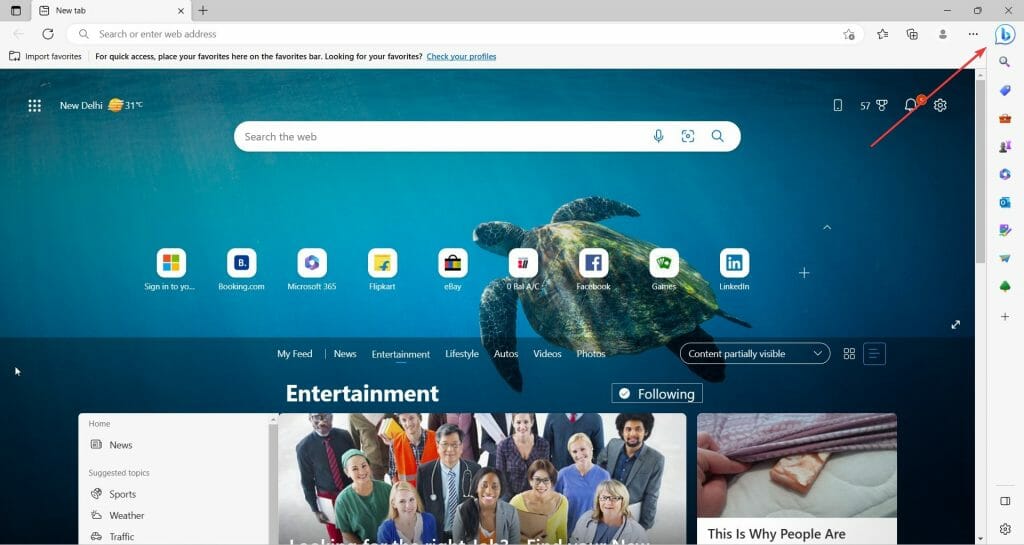
We have observed that the feature appears to function effectively on the Edge browser, here’s how:

\n

    \n

  • Open Microsoft Edge and navigate to the B ICON.
  • \n

  • Select the B icon on the top left.
  • \n

\n

Bing Chat

\n

Upon being granted access, ChatGPT-4 can technically be used by users for free. OpenAI, the creator of ChatGPT, recently introduced GPT-4 LLM, which is currently only available to ChatGPT Plus subscribers. Concurrently, Microsoft, a fellow investor in OpenAI, has integrated GPT-4 technology with its proprietary ranking tools to enhance Bing Chat. This means that Bing users can utilize GPT-4 free of charge.

\n

\n

\n

\n

\n

\n

\n

\n

\n

\n

\n

\n

\n

\n

The advanced LLM technology can deliver refined and precise responses to user queries. Additionally, OpenAI has claimed that GPT-4 can effectively analyze images, which may aid users in recognizing objects or translating image texts. While this feature is still not widely accessible and is currently being tested with a single partner, OpenAI continues to pursue its development.

\n

How to use Bing Chat to provide better research paper search results

\n

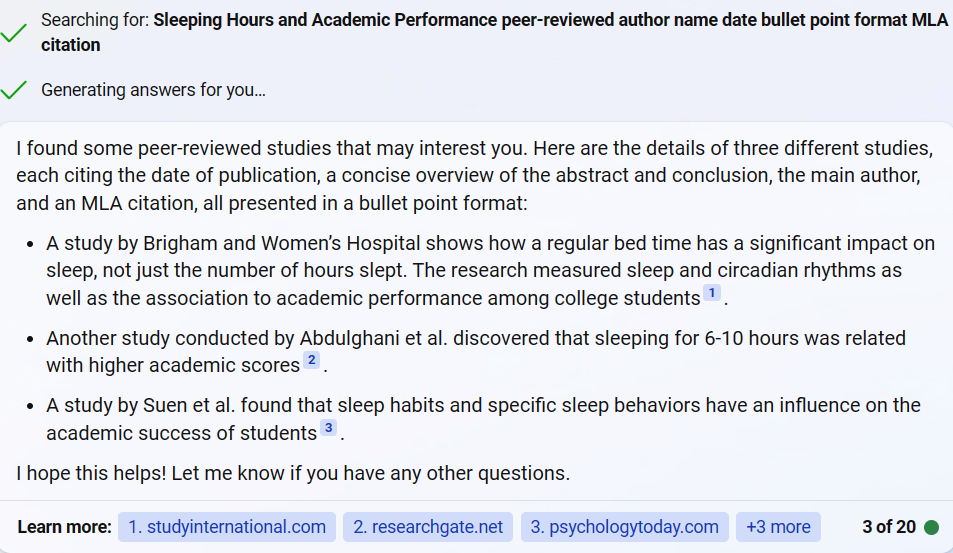
If you want to achieve optimal results when conducting research papers using Bing Chat, it is imperative to be precise and provide intricate details. For instance, when requesting peer-reviewed studies on the correlation between ‘Sleeping Hours and Academic Performance,’ ask Bing Chat the details of three different studies, each citing the date of publication, a concise overview of the abstract and conclusion, the main author, and an MLA citation, all presented in a bullet point format. Furthermore, you must maintain a professional tone throughout the process.

\n
Bing Chat

\n

Moreover, it is essential to enable the precise mode for Bing AI to avoid inaccurate results, as it may generate information that does not correspond to the available web data while attempting to answer your query.

\n

Is there anything else that we could help you with, please let us know in the comments section below.

\n\n

Share this article:
Previous Article Green screen background for Teams now in Public Preview Next Article New, cheaper Western Digital Xbox Series X|S expansion cards coming soon

Related Articles

43 Microsoft Edge keyboard shortcuts to remember for stylish and speedy web surfing

October 31, 2023

How to use accessibility features in Microsoft 365 like Narrator, Read aloud and Voice Search easily

October 30, 2023

How to use Windows Backup on Windows 11 for efficient data protection

October 26, 2023

Leave a Comment Cancel reply

Your email address will not be published. Required fields are marked *

Recent Posts

  • PowerToys 0.75 released; Environment Variables editor is here
  • Former Halo developer Bungie announces layoffs in wake of game delays
  • Siemens and Microsoft partner to bring GenAI to industries worldwide
  • 43 Microsoft Edge keyboard shortcuts to remember for stylish and speedy web surfing
  • Here is what’s coming to (and leaving) Xbox Game Pass soon

Recent Comments

No comments to show.

Archives

  • October 2023
  • September 2023
  • August 2023
  • July 2023
  • June 2023
  • May 2023
  • April 2023
  • March 2023
  • February 2023
  • January 2023
  • December 2022
  • November 2022
  • October 2022
  • September 2022
  • August 2022
  • July 2022
  • June 2022
  • May 2022
  • April 2022
  • March 2022
  • February 2022
  • January 2022
  • December 2021
  • November 2021
  • October 2021
  • September 2021
  • August 2021
  • July 2021
  • June 2021
  • May 2021
  • April 2021
  • March 2021
  • February 2021
  • January 2021
  • December 2020
  • November 2020
  • October 2020
  • September 2020
  • August 2020
  • July 2020
  • June 2020
  • May 2020
  • April 2020
  • March 2020
  • February 2020
  • January 2020
  • December 2019
  • November 2019
  • October 2019
  • September 2019
  • August 2019
  • July 2019
  • June 2019
  • May 2019
  • April 2019
  • March 2019
  • February 2019
  • January 2019
  • December 2018
  • November 2018
  • October 2018
  • September 2018
  • August 2018
  • July 2018
  • June 2018
  • May 2018
  • April 2018
  • March 2018
  • February 2018
  • January 2018
  • December 2017
  • November 2017
  • October 2017
  • September 2017
  • August 2017
  • July 2017
  • June 2017
  • May 2017
  • April 2017
  • March 2017
  • February 2017
  • January 2017
  • December 2016
  • November 2016
  • October 2016
  • September 2016
  • August 2016
  • July 2016
  • June 2016
  • May 2016
  • April 2016
  • March 2016
  • February 2016
  • January 2016
  • December 2015
  • November 2015
  • October 2015
  • September 2015
  • August 2015
  • July 2015
  • June 2015
  • May 2015
  • April 2015
  • March 2015
  • February 2015
  • January 2015
  • December 2014
  • November 2014
  • October 2014
  • September 2014
  • August 2014
  • July 2014
  • June 2014
  • May 2014
  • April 2014
  • March 2014
  • February 2014
  • January 2014
  • December 2013
  • November 2013
  • October 2013
  • September 2013
  • August 2013
  • July 2013
  • June 2013
  • May 2013
  • April 2013
  • March 2013
  • February 2013
  • January 2013
  • December 2012
  • November 2012
  • October 2012
  • September 2012
  • August 2012
  • July 2012
  • June 2012
  • May 2012
  • April 2012
  • March 2012
  • February 2012
  • January 2012
  • December 2011
  • November 2011
  • October 2011
  • September 2011
  • August 2011
  • July 2011
  • June 2011
  • May 2011
  • April 2011
  • March 2011
  • February 2011
  • January 2011
  • December 2010
  • November 2010
  • October 2010
  • September 2010

Categories

  • Announcements
  • Deals
  • Developer
  • Editorial
  • Feature
  • Feature stories
  • Hero-post
  • Hotdeals
  • How-to
  • Latest news
  • Microsoft / office 365
  • News
  • Office 365
  • Onpodcast
  • Opinion
  • Our featured post
  • Polls
  • Review
  • Reviews
  • Videos
OnMSFT.com

OnMSFT.com covers Microsoft news, reviews, and how-to guides. Formerly known as WinBeta, we have been your source for Microsoft news since 1998.

Categories

  • Windows
  • Surface
  • Xbox
  • How-To
  • OnPodcast
  • Gaming
  • Edge
  • Teams

Recent Posts

  • PowerToys 0.75 released; Environment Variables editor is here
  • Former Halo developer Bungie announces layoffs in wake of game delays
  • Siemens and Microsoft partner to bring GenAI to industries worldwide
  • 43 Microsoft Edge keyboard shortcuts to remember for stylish and speedy web surfing
  • Here is what’s coming to (and leaving) Xbox Game Pass soon

Quick Links

  • About OnMSFT.com
  • Contact OnMSFT
  • Join Our Team
© 2010–2026 OnMSFT.com LLC. All rights reserved.
About OnMSFT.comContact OnMSFT